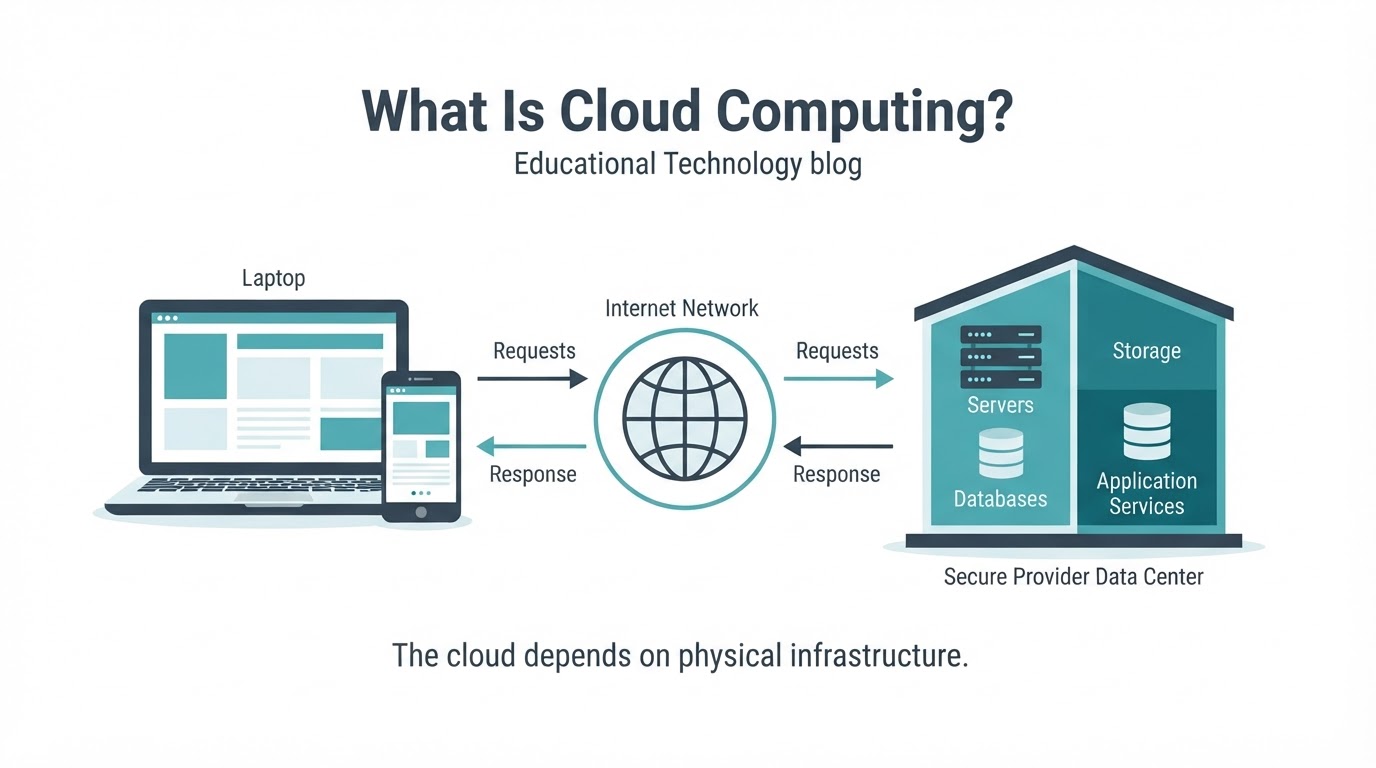
Cloud computing is the delivery of computing resources and services over a network, usually the internet. Instead of owning and managing every server, storage device, database, and software system yourself, you access resources operated by a cloud provider when you need them.
The cloud powers online documents, email, photo synchronization, streaming, business applications, databases, analytics, and AI services. Cloud computing is broader than saving files online: it can include processing power, virtual machines, networking, applications, and managed development platforms.
The word “cloud” does not mean that data exists in an intangible location. Cloud services depend on physical data centers containing servers, storage systems, networking equipment, power infrastructure, and cooling systems. The key difference is who operates that infrastructure and how you access it.
Cloud services can improve flexibility, collaboration, and access to technology, but they also introduce internet dependence, variable costs, provider outages, security responsibilities, and recovery challenges. This guide explains how cloud computing works, its main models, common examples, and what to consider before relying on a cloud service.
What Is Cloud Computing in Simple Terms?
Cloud computing means using computing resources managed by a provider through a network instead of owning and operating all the underlying hardware yourself.
Those resources may include processing power, virtual machines, storage, databases, networking, software, analytics, and AI services. You can often request or access them when needed, adjust usage as requirements change, and release them without physically installing or removing equipment.
For example, opening an online document may involve an application service, remote storage, identity and permission systems, networking, and databases. Your device provides the interface, while provider infrastructure performs some or all of the processing and stores the document.
Cloud computing is not automatically cheaper, perfectly secure, or available without a network connection. Its value depends on the workload, service design, configuration, pricing, and responsibilities shared between the provider and customer.
How Does Cloud Computing Work?
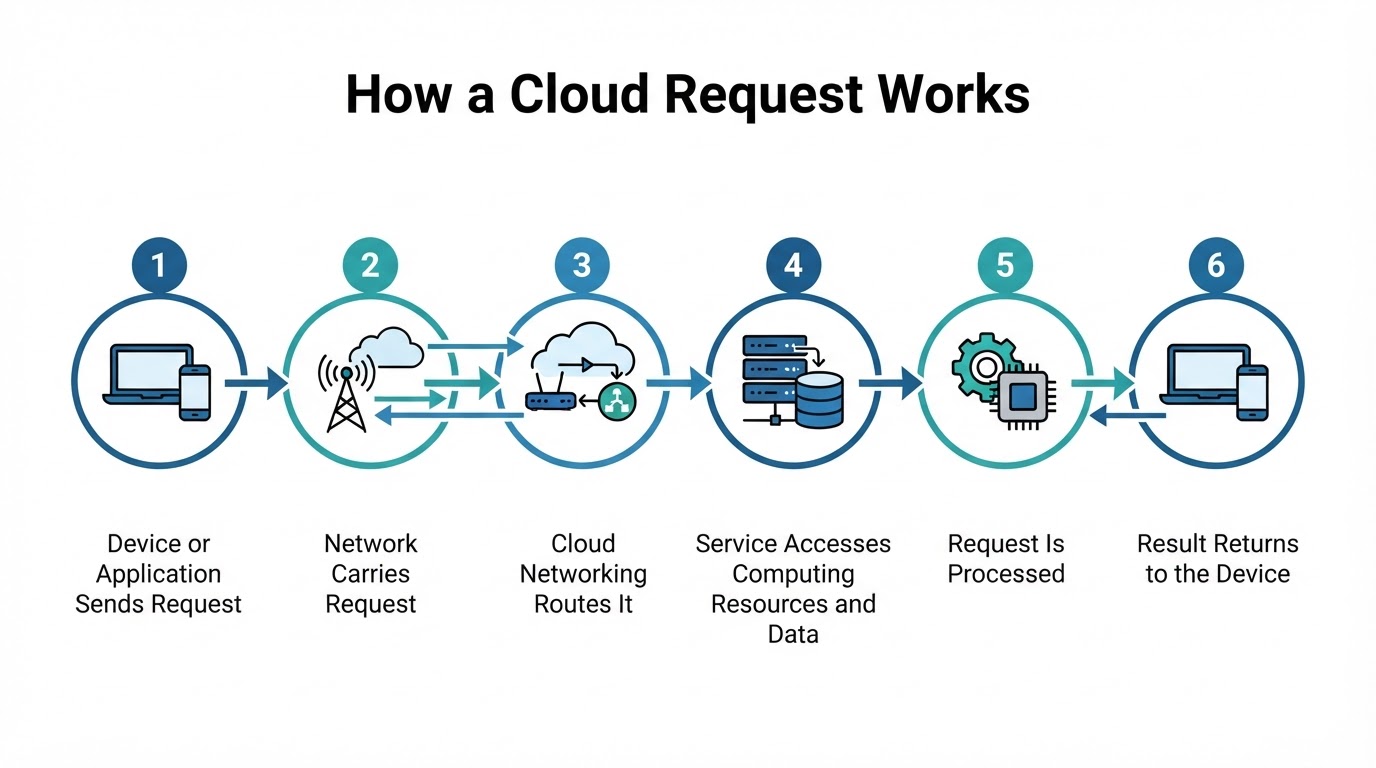
A typical cloud request begins when a device or application sends information through a browser, mobile app, command-line tool, or API. Networking routes the request to the appropriate cloud service, region, application, or data store.
The provider then uses or allocates the resources needed to handle the request. These may include virtual machines, containers, databases, object storage, file storage, block storage, or a managed application service. Application code may retrieve information from a database, cache, or storage system before producing a result.
The response travels back through the network to your device or to the application that made the request. Supporting systems may handle identity, permissions, monitoring, logging, patching, security configuration, and scaling.
A simplified request path is:
- Your phone, computer, or application sends a request.
- A network connection carries the request toward the provider.
- Cloud networking directs it to the relevant service and infrastructure.
- The application accesses required computing resources and data.
- The service processes the request.
- The result returns to your device or calling application.
Cloud Storage vs. Cloud Computing
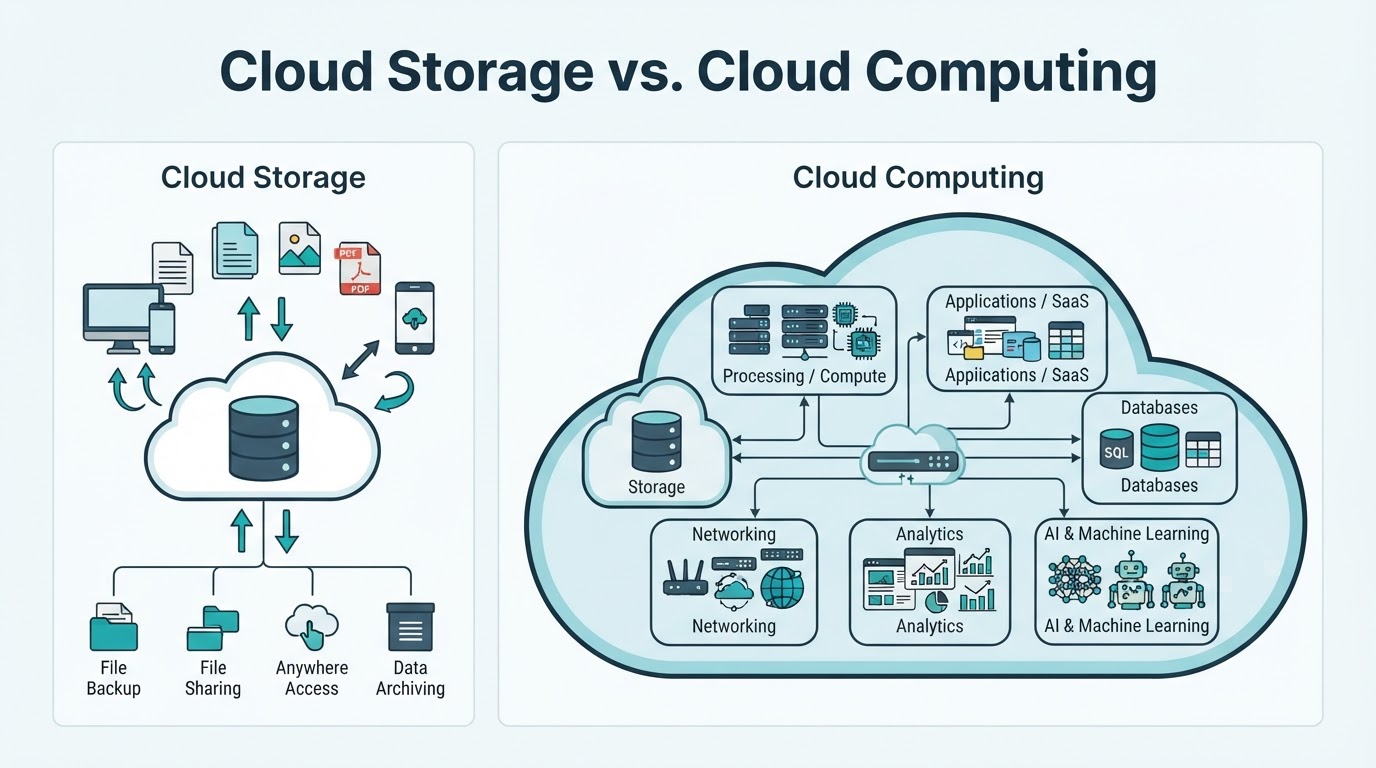
Cloud storage is one category of cloud service. It lets you store and access files or other data through a network. Cloud computing is the broader model, covering storage as well as processing, databases, applications, networking, analytics, and AI services.
A photo application, for example, may use cloud storage for image files, identity systems for account access, databases for descriptions and metadata, processing services for image changes, and networking for synchronization.
| Comparison | Cloud storage | Cloud computing |
|---|---|---|
| Main purpose | Store and access files or data | Deliver computing resources and services |
| Typical examples | File synchronization, online drives, object storage | Online applications, virtual machines, databases, analytics, and AI services |
| User interaction | Uploading, downloading, sharing, and synchronizing data | Using applications, running workloads, processing data, or managing infrastructure |
| Underlying resources | Storage systems, networking, permissions, and recovery features | Storage, processing, networking, databases, applications, identity, and monitoring |
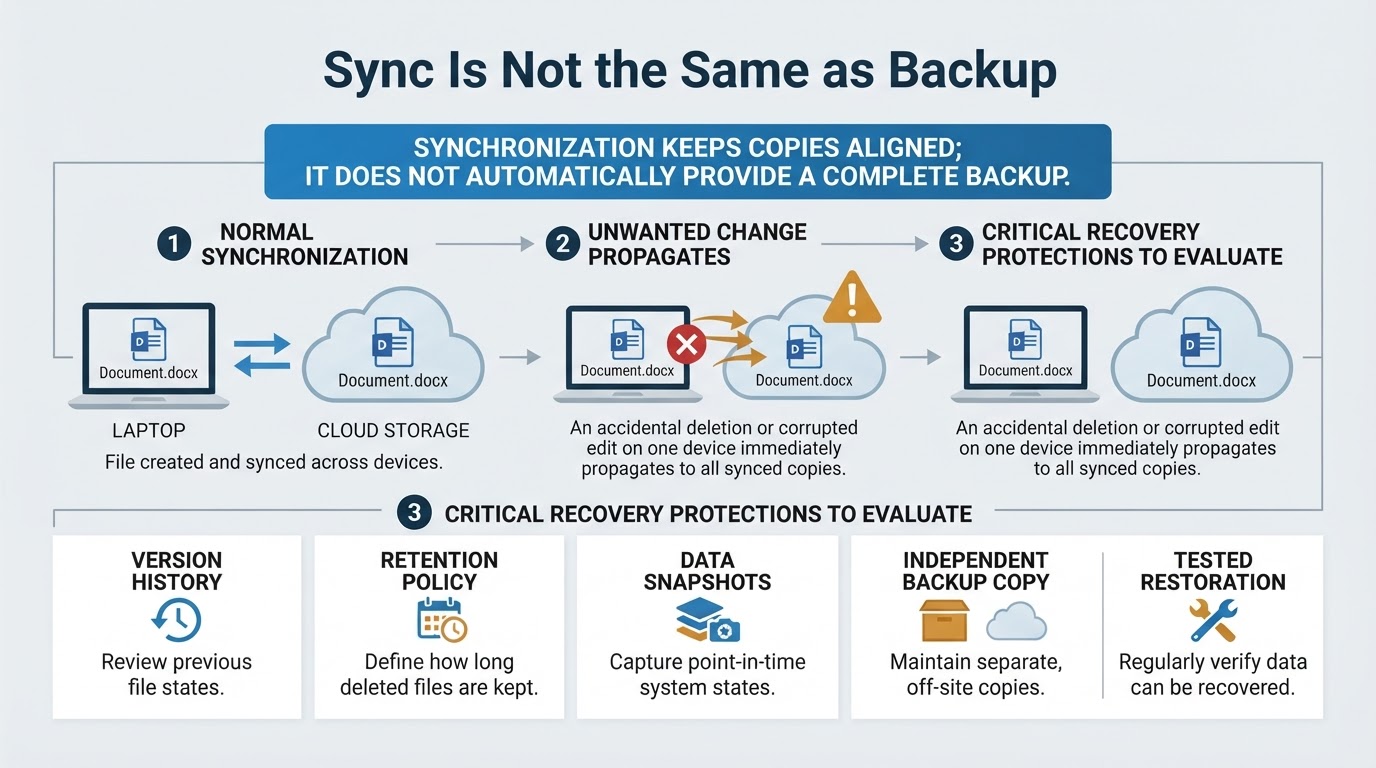
Cloud file synchronization is not automatically an independent backup. If an unwanted deletion or corrupted change synchronizes across devices, the copies may reflect the same problem unless version history, retention, snapshots, or separate backups are available.
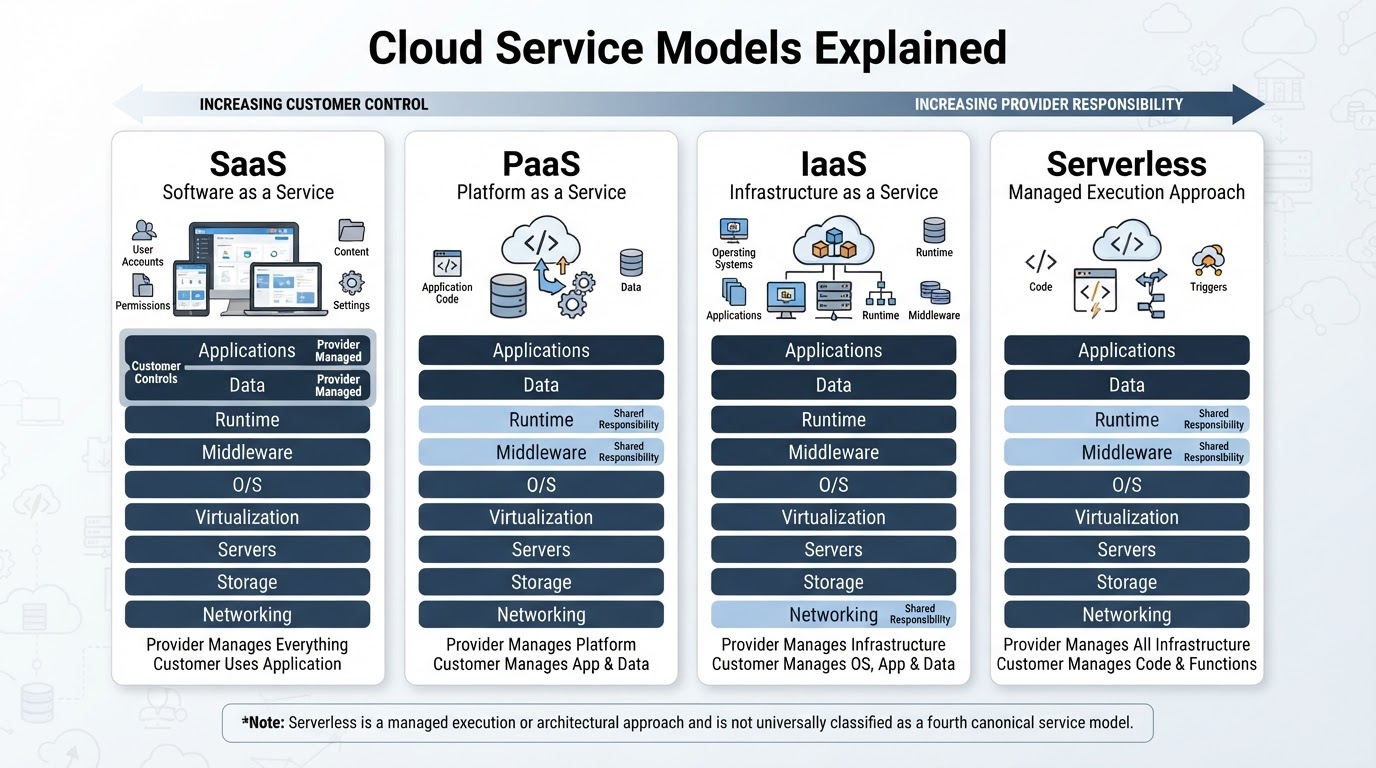
Cloud Service Models: SaaS, PaaS, IaaS, and Serverless
Service models describe how much of the technology the provider manages and how much control the customer retains. SaaS, PaaS, and IaaS are the three commonly recognized canonical cloud service models. Serverless is widely used as a managed execution or architectural approach, but it is not universally classified as a fourth service model.
| Service model | Customer control | Provider responsibility | Common users |
|---|---|---|---|
| SaaS | Accounts, permissions, content, and application settings | Application and underlying infrastructure | General users, businesses, and teams |
| PaaS | Application code, data, identities, and configuration | Much of the infrastructure and platform software | Developers and application teams |
| IaaS | Operating systems, applications, data, and network configuration | Physical infrastructure and core virtualization | Developers, IT teams, and organizations |
| Serverless approach | Code, triggers, data, and service configuration | Server provisioning and much of the infrastructure operation | Developers building event-driven or managed workloads |
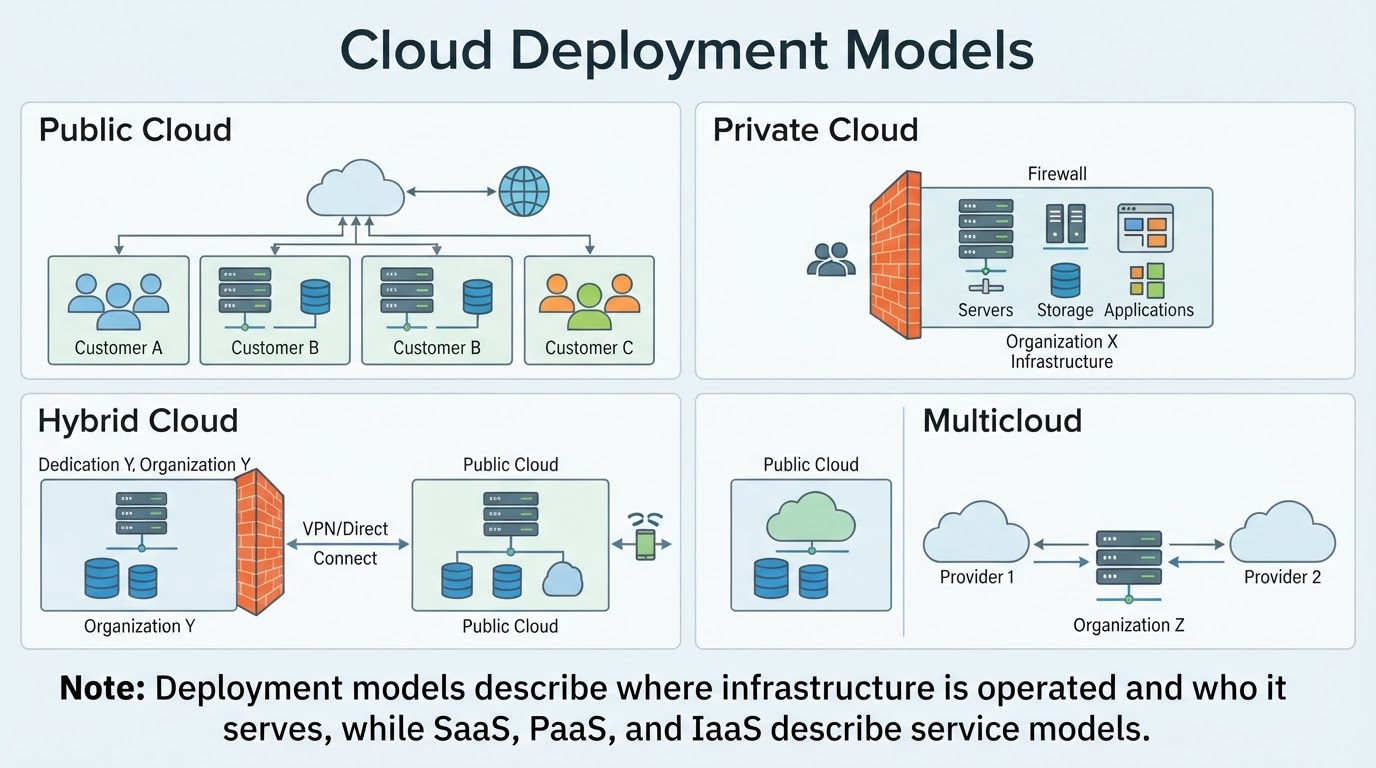
Public, Private, Hybrid, and Multicloud
Deployment models describe where cloud infrastructure is operated and who or what it is intended to serve. They answer a different question from service models such as SaaS, PaaS, IaaS, and serverless.
An organization might use SaaS in a public cloud, IaaS in a private environment, or several services across different arrangements.
Examples of Cloud Computing
Many services that appear to be single applications are combinations of cloud layers. The visible interface may rely on storage, processing, databases, identity systems, networking, and content delivery behind the scenes.
Benefits, Costs, and Limitations of Cloud Computing
Cloud computing is widely used because it can make computing resources easier to access and adjust. Common benefits include:
- Access to applications and data from supported devices and locations through a network.
- On-demand provisioning and the ability to adjust resources as needs change.
- Less physical hardware ownership for some organizations.
- Managed infrastructure that reduces the amount of hardware and platform software customers operate.
- Faster experimentation and deployment for developers, students, creators, and small teams.
- Support for collaboration, analytics, streaming, development, and other workloads.
- Usage-based spending when pay-as-you-go pricing aligns with actual demand.
These benefits are not guarantees. Cloud services may not be the lowest-cost option for every workload, and scaling depends on architecture, quotas, rate limits, configuration, dependencies, and budget.
Cloud Security, Privacy, and Shared Responsibility
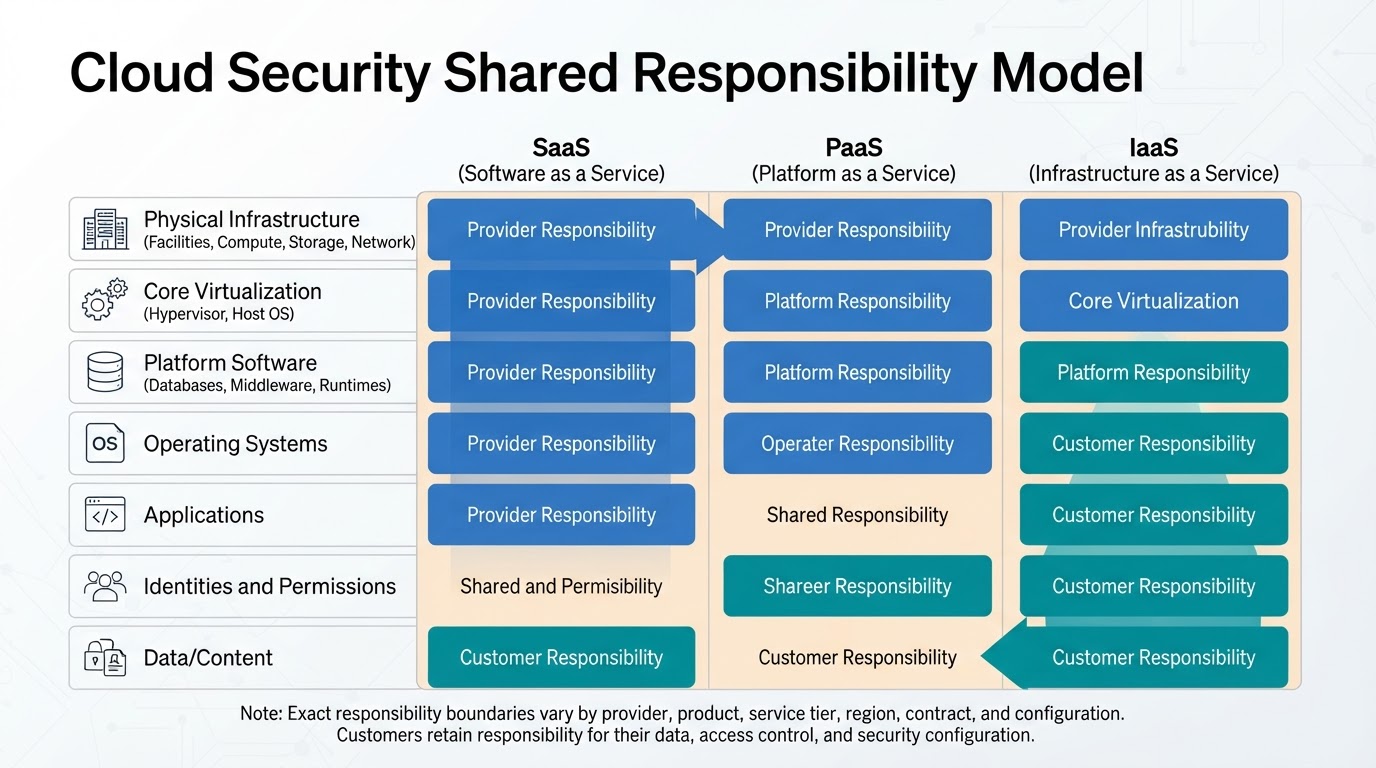
Cloud security follows a shared responsibility model, but the exact boundary differs among providers, products, service tiers, regions, contracts, and configurations. The provider generally protects its underlying infrastructure, while the customer’s responsibilities vary according to the service being used.
For SaaS, the provider generally operates the application and infrastructure, while customers manage accounts, permissions, content, and settings. In PaaS, the provider manages much of the platform, while the customer remains responsible for application code, data, identities, and configuration. In IaaS, the customer typically has more responsibility for operating systems, applications, network settings, permissions, and data.
Provider certifications and infrastructure controls do not guarantee that a customer’s credentials, application, permissions, or storage settings are secure. Strong, unique passwords, multifactor authentication, least privilege, separate administrator and routine-use accounts, logging, monitoring, patching, and secure configuration remain important.
Encryption in transit and at rest can help protect data, but encryption does not replace access controls, key management, monitoring, governance, or recovery planning. Privacy decisions should also consider data collection, use, retention, sharing, account recovery, export, deletion, geographic processing, and contractual obligations.
How to Choose and Use a Cloud Service Responsibly
Start with the actual requirement rather than choosing a cloud model because it sounds modern. Your need may be file synchronization, backup, application hosting, database access, development, analytics, AI processing, or another workload.
Use this decision process:
- Define the workload and the people or applications that need access.
- Choose the appropriate control level: SaaS, PaaS, IaaS, serverless, another managed service, or a hybrid design.
- Classify the data and identify sensitivity, retention, recovery, geographic, and contractual requirements.
- Estimate total cost, including consumption, storage, transfer, backups, support, licenses, migration, monitoring, and administration.
- Evaluate identity management, encryption, logging, privacy practices, export options, and account recovery.
- Review quotas, rate limits, regions, compatibility, APIs, portability, and provider dependence.
- Test the service with realistic data and network conditions before migrating important workloads.
- Create a recovery plan with retention, independent copies where appropriate, restore procedures, and recovery testing.
- Review usage, security alerts, access logs, service limits, and costs regularly.
Conclusion
Cloud computing is a broad way to access shared computing resources through a network. It can provide applications, processing, databases, networking, analytics, storage, and more—not just online file storage.
SaaS, PaaS, and IaaS describe common levels of provider management, while serverless describes a widely used managed execution approach. Public, private, hybrid, and multicloud describe deployment arrangements.
Cloud services can improve accessibility, flexibility, collaboration, and infrastructure efficiency, but they do not eliminate latency, outages, variable costs, security responsibilities, provider dependence, or recovery planning. Choose a service based on the workload, required control, data sensitivity, connectivity, total cost, recovery needs, and portability.