
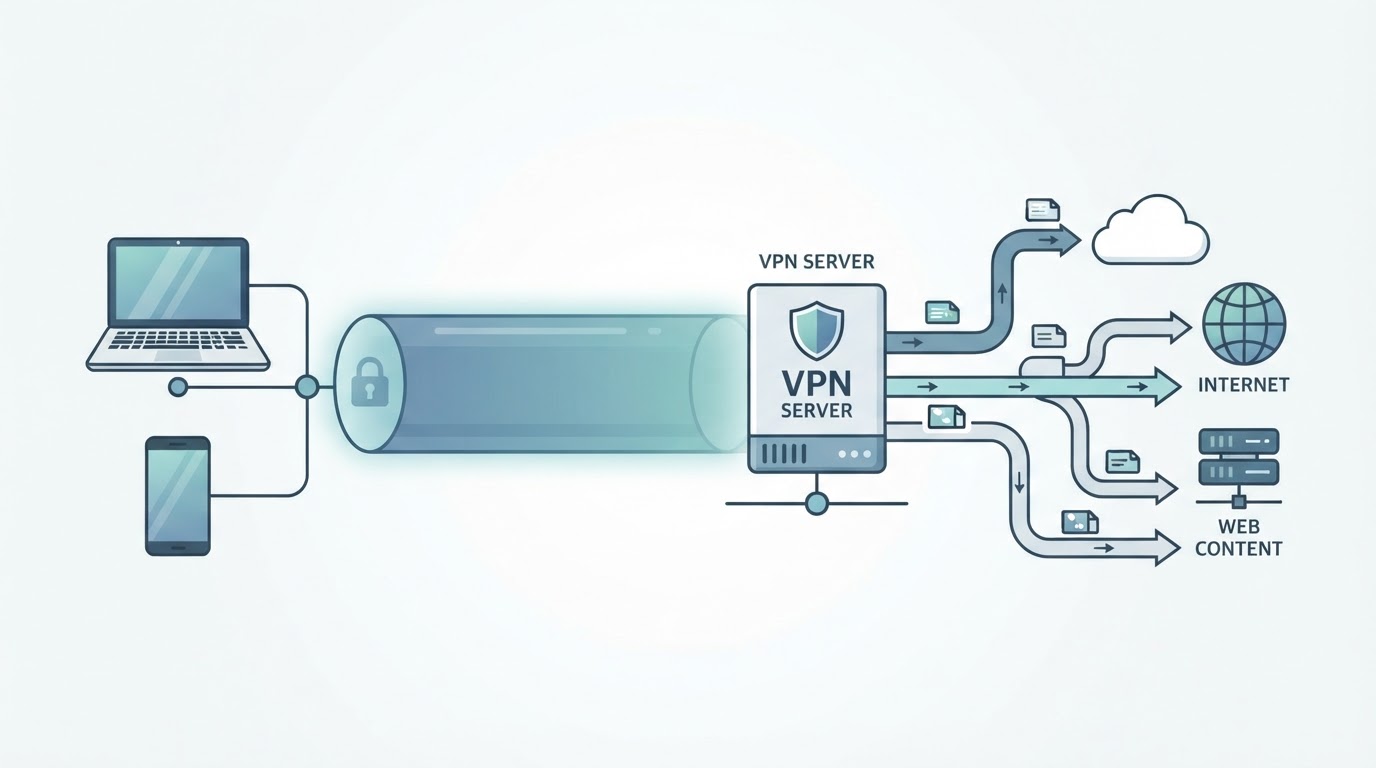
A VPN, or virtual private network, creates a protected connection between your device and a VPN server over an existing network, usually the internet. Traffic covered by the VPN is routed through that server, which can reduce what your local network or internet service provider sees directly and can make destination websites see the VPN server's public IP address instead of your own.
A VPN is not a complete anonymity or security solution. Its encryption, authentication, and traffic coverage depend on the protocol, implementation, operating system, client version, and configuration. It also does not replace HTTPS or protect you from every online threat. This guide explains what a VPN does, how it works, where its protection ends, and how to use one safely.
What Is a VPN in Simple Terms?
A VPN creates a logical connection between your device and a VPN server. Traffic selected for the VPN is encapsulated and, in a properly configured VPN implementation, protected while traveling between those endpoints. The VPN server then routes the traffic onward according to the service's design.
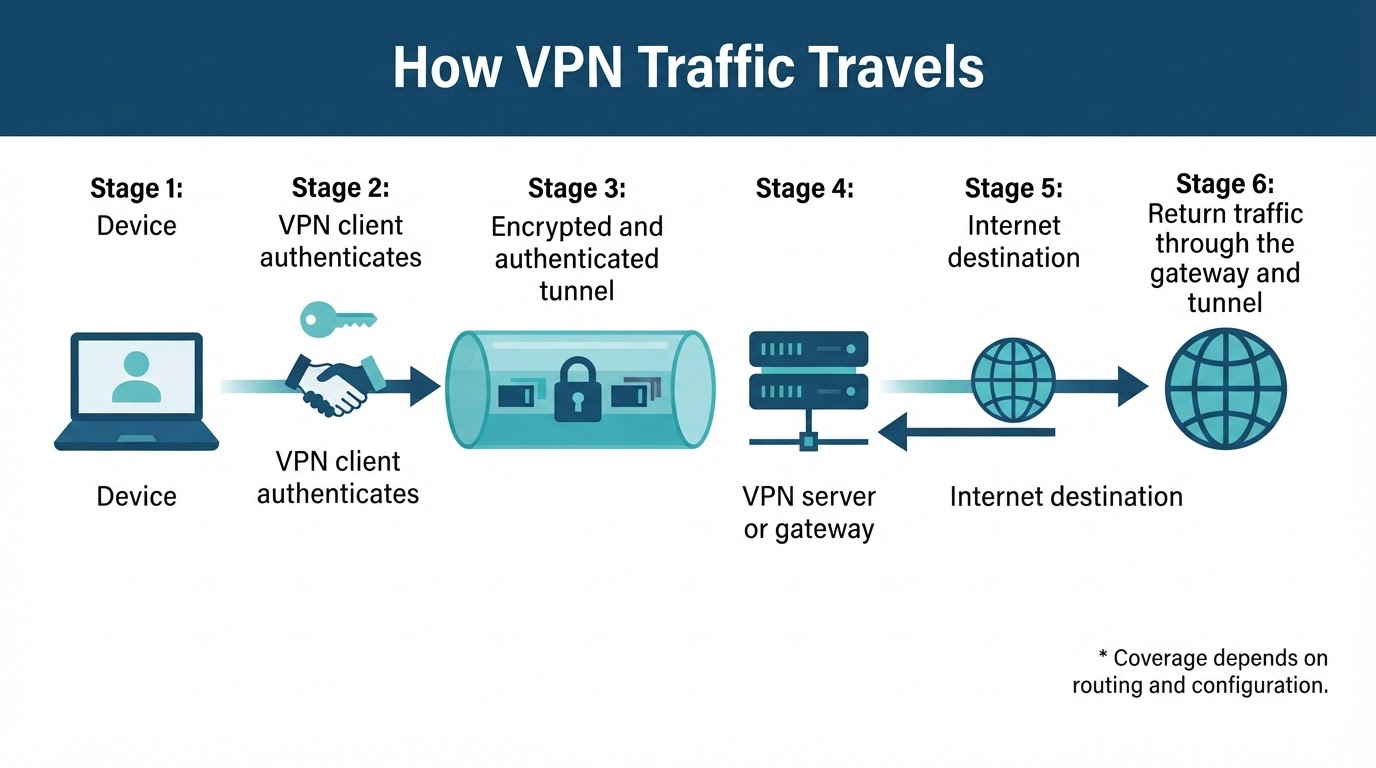
Without a VPN, your device normally connects to online services through your local router and internet service provider. With a VPN, the route changes: your device connects to the VPN server, and that server becomes the apparent public source for traffic sent through the tunnel. Websites generally see the VPN server's public IP address rather than the public IP address assigned to your home or mobile connection.
The VPN provider becomes an important party in this arrangement. A VPN may reduce what your local network or ISP can see directly, but supported traffic still passes through infrastructure operated or controlled by the VPN provider. That is why the provider's privacy practices, business model, technical documentation, and security history matter.
How Does a VPN Work?
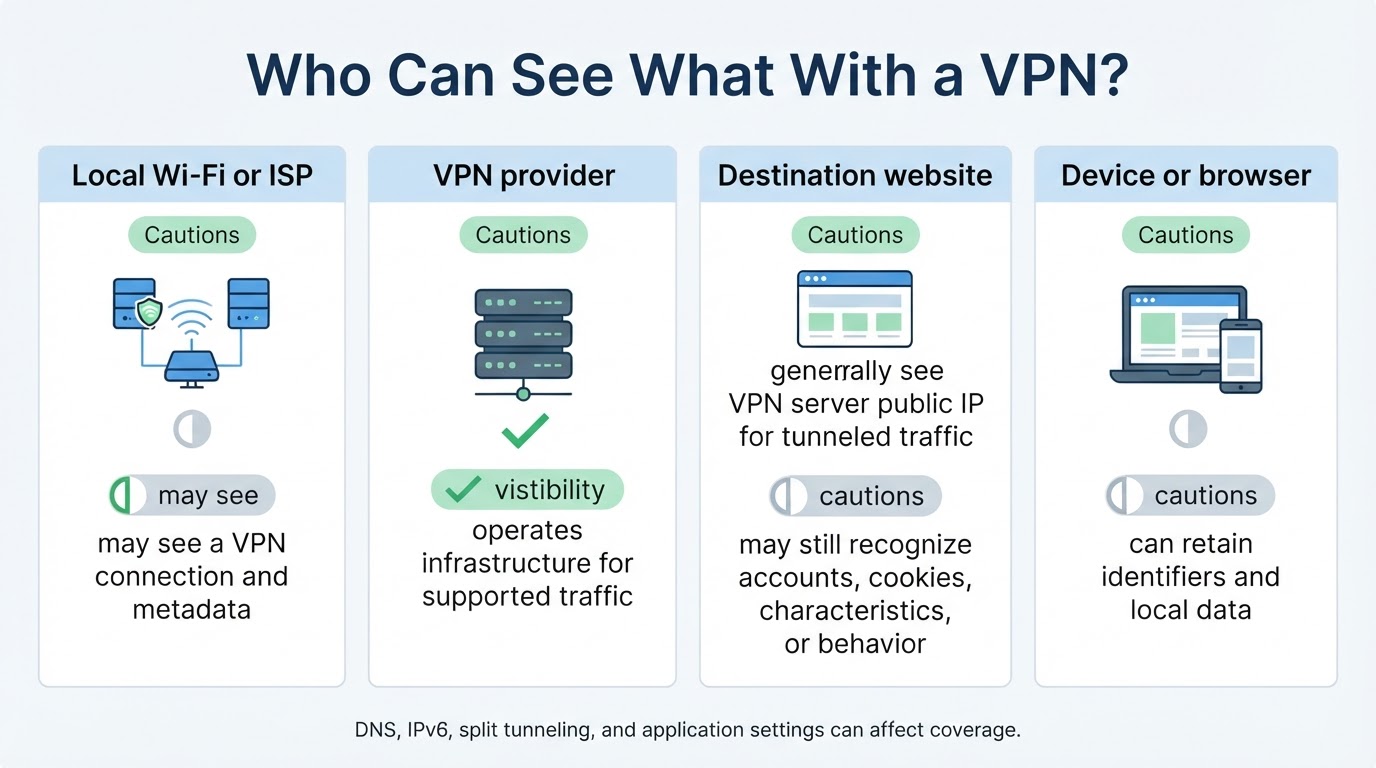
A typical VPN connection works as follows:
- You install or configure a VPN client on your device, or connect through a configured router or operating-system setting.
- The client authenticates with the VPN service or organization.
- You select a server or gateway, or the client chooses one according to its settings.
- The client and server negotiate a session using the supported VPN protocol and configuration.
- A tunnel is established, and traffic selected by the routing rules is sent through the VPN interface.
- The VPN gateway processes the tunnel traffic and routes it toward an internet destination or private network.
- Return traffic travels back through the gateway and tunnel to your device.
This simplified sequence describes a common remote-access or consumer setup. VPN architectures differ, and not every technology called a VPN has identical encryption, authentication, routing, or coverage.
What Can a VPN Protect or Hide?
A VPN changes what different observers can see about traffic covered by the tunnel. It can reduce a local network operator's or ISP's direct visibility into destinations, add a protected transport layer on an untrusted network, and make destination websites generally see the VPN server's public IP address instead of your original public IP address.
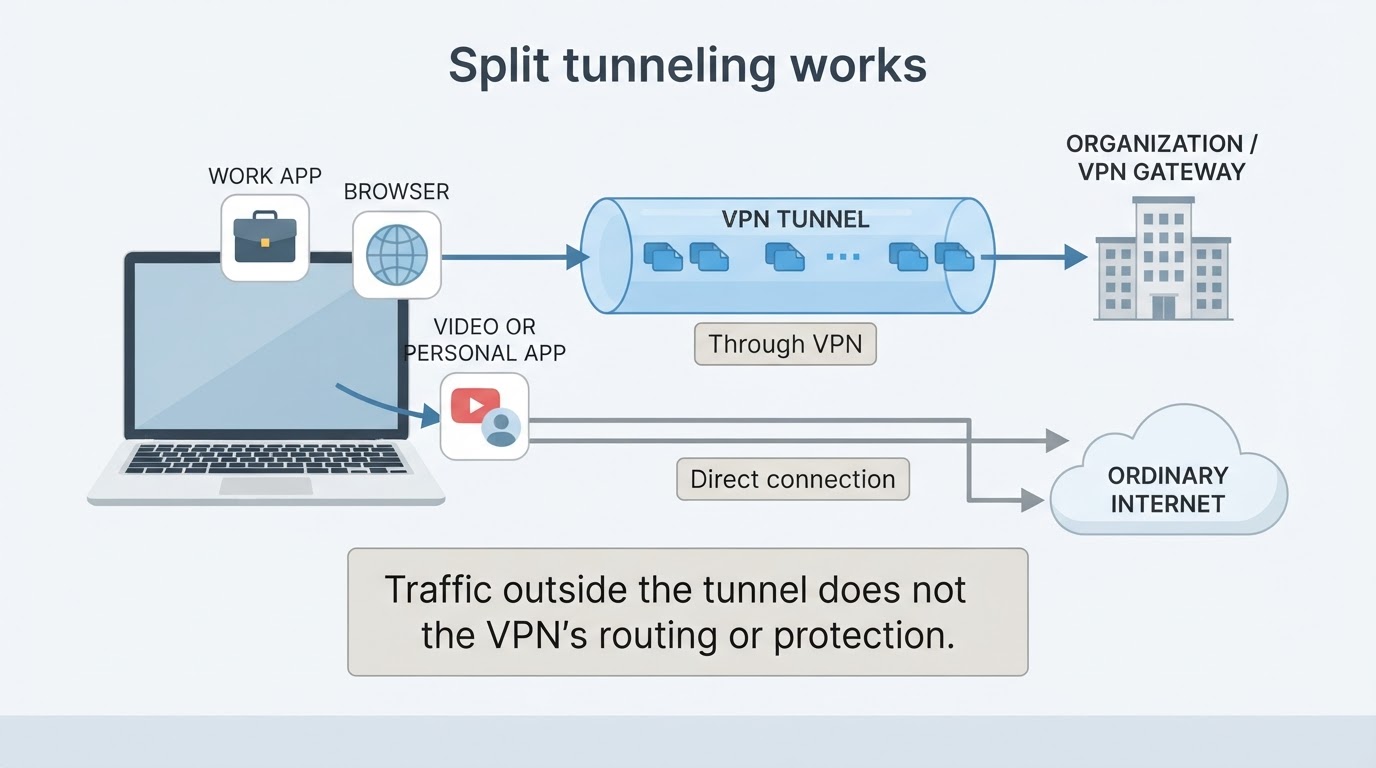
These benefits depend on coverage and configuration. DNS requests, IPv6 traffic, browser or application behavior, split-tunnel rules, and other leak conditions can send some information outside the VPN. A changed public IP address alone does not prove that every request or application is using the tunnel.
What Does a VPN Not Protect Against?
A VPN primarily changes routing and protects a particular network segment. It does not provide complete anonymity, endpoint security, or protection from every form of online deception.
A VPN does not automatically protect against:
- Malware, ransomware, malicious downloads, or compromised applications
- Phishing websites, fraudulent messages, or social engineering
- Unsafe browser extensions
- Weak, reused, or stolen passwords
- Account takeovers when appropriate authentication controls are absent
- Information you voluntarily submit, such as an email address, payment details, or form contents
- Tracking through cookies, browser characteristics, device identifiers, or behavior
- A compromised device or malicious VPN application
- Traffic leaks, routing errors, or coverage gaps caused by application and system settings
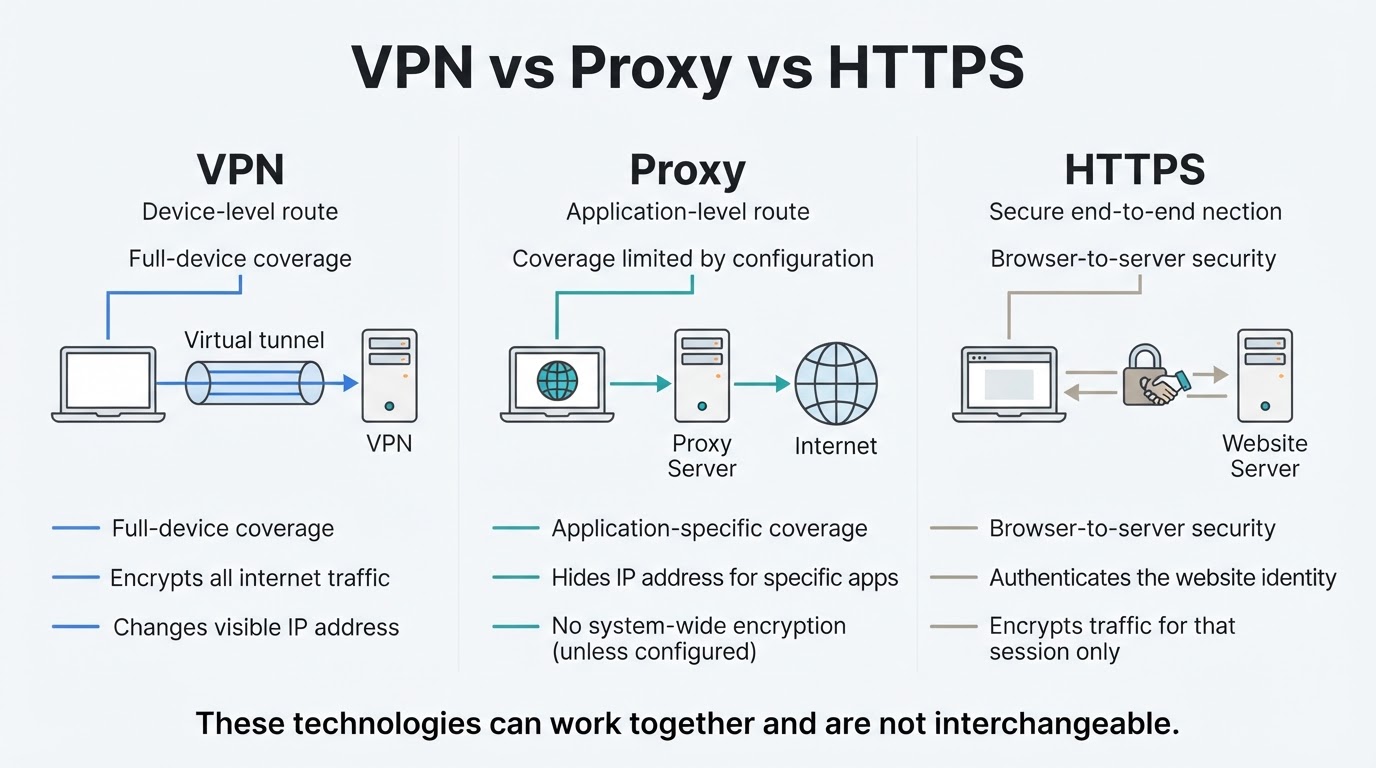
A VPN also does not make an unencrypted HTTP connection secure after traffic leaves the VPN server. HTTPS or another form of application-level protection remains important.
VPN vs Proxy vs HTTPS: What Is the Difference?
VPNs, proxies, and HTTPS can all affect how internet traffic is routed or protected, but they are not interchangeable.
Consumer VPNs, Business VPNs, and Split Tunneling
Not every VPN is designed for the same purpose.
- Consumer privacy VPN: Usually routes supported internet traffic through provider-operated servers.
- Organization-provided remote-access VPN: Connects an authorized user or device to private internal resources according to organizational permissions.
- Site-to-site VPN: Connects two network gateways so separate networks can communicate through a protected connection.
- Full-device VPN: Routes much or all of a device's traffic according to system routing and exclusion settings.
- Router-based VPN: Applies VPN routing to devices connected through a configured router, subject to that router's capabilities and rules.
- Application-level VPN or proxy: Applies routing or protection only to selected applications, browsers, or protocols.
Protocol choice can affect compatibility, performance, and security properties. The available protocols and their behavior should be checked in current provider or organizational documentation.
Are VPNs Safe? How to Evaluate a Provider
Using a VPN transfers substantial trust from your local network or ISP to the VPN provider. This does not automatically make a VPN unsafe, but the provider's policies and technical practices matter.
Before installing a service, review its privacy policy and documentation. Look for clear explanations of data collection, retention, sharing, ownership, access, and the meaning of its logging claims. Consider software permissions, supported protocols, authentication options, documented DNS and leak-prevention behavior, and connection-failure controls.
A provider's privacy policy, no-logs statement, audit, or other marketing claim is not by itself conclusive proof of real-world data handling. Treat self-attestations, independent assessments, technical testing, and incident history as different types of evidence. Also review the provider's business model and download software only from its official website or a trusted official app store.
How to Use a VPN Safely
Start with a clear goal. You may want additional protection on public Wi-Fi, reduced direct visibility from a local network, access to work resources, site-to-site connectivity, or application-specific routing. Choose the VPN category and coverage that match that goal.
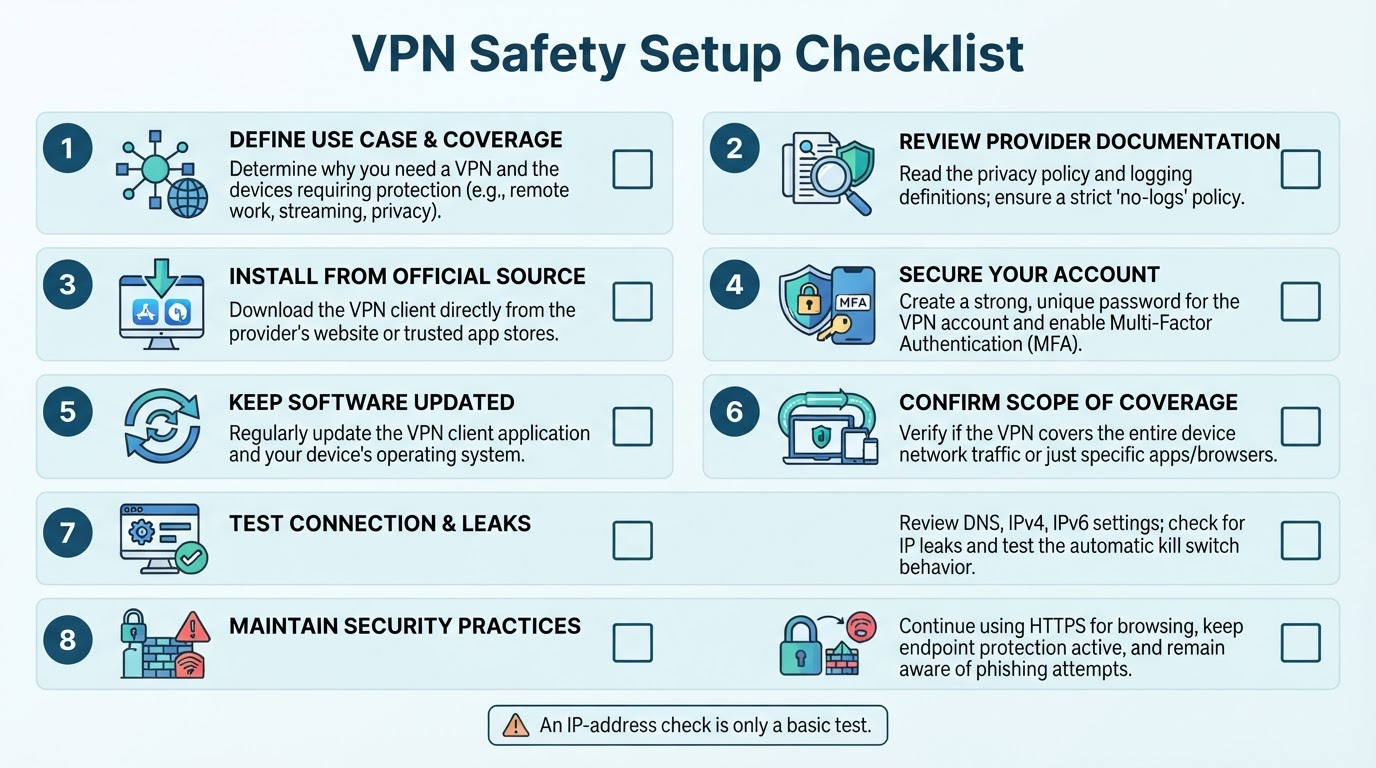
A practical setup workflow is:
- Define the use case. Identify what traffic needs protection and whether you need a consumer VPN, organization-provided VPN, site-to-site connection, or application-specific proxy.
- Review documentation. Read the privacy policy, logging definitions, supported protocols, permissions, traffic coverage, DNS handling, and connection-failure behavior.
- Install the official client. Download it from the provider's official website or a trusted official app store.
- Secure the account. Use a strong, unique password and enable multi-factor authentication where available.
- Update the client and operating system. Do this before relying on the connection.
- Choose an appropriate server or gateway. A nearby server may help performance, while an organizational use case may require a particular gateway.
- Connect before sensitive activity. Do not assume that protection applies retroactively to traffic sent before the connection was active.
- Perform a limited IP check if necessary. A reputable public-IP testing site can show the apparent public IP address. Use a service that does not require unnecessary personal information, and remember that an IP check does not test DNS, IPv6, WebRTC behavior, application coverage, kill-switch effectiveness, provider logging, or endpoint security.
- Review settings. Check auto-connect, split tunneling, application exclusions, DNS-related settings, IPv4 and IPv6 behavior, and connection-failure controls. Availability and behavior vary by operating system, client version, provider, and configuration.
- Keep other protections active. Continue using HTTPS, strong passwords, multi-factor authentication, updated software, endpoint protection, and phishing awareness.
VPN Speed, Server Location, and Access Limitations
A VPN may reduce performance because traffic takes an additional routing path and is processed by the VPN service. The effect varies with provider capacity, protocol, server distance, congestion, device resources, network quality, workload, and the destination service.
A nearby server may help in some situations, but there is no universal speed result. Compare the ordinary connection with a nearby VPN server and, where supported, another protocol under similar conditions. Test the activities you actually care about, such as browsing, video calls, file transfers, or gaming.
A different apparent IP address may also change how a website or streaming service responds. However, services can detect and restrict known VPN addresses, so access to a particular platform or region is not guaranteed. Account identity, cookies, device characteristics, and other signals may still apply.
Conclusion
A VPN is a routing and privacy tool that can protect supported traffic between your device and a VPN server, reduce some local-network or ISP visibility, and change the public IP address seen by destination websites. It does not provide complete anonymity, replace HTTPS, or protect against malware, phishing, weak authentication, unsafe downloads, or a compromised device.
Choose a VPN based on your actual goal and required coverage. Review the provider's privacy and technical documentation, understand DNS, IPv4, IPv6, application, and split-tunnel behavior, and continue using layered security.