
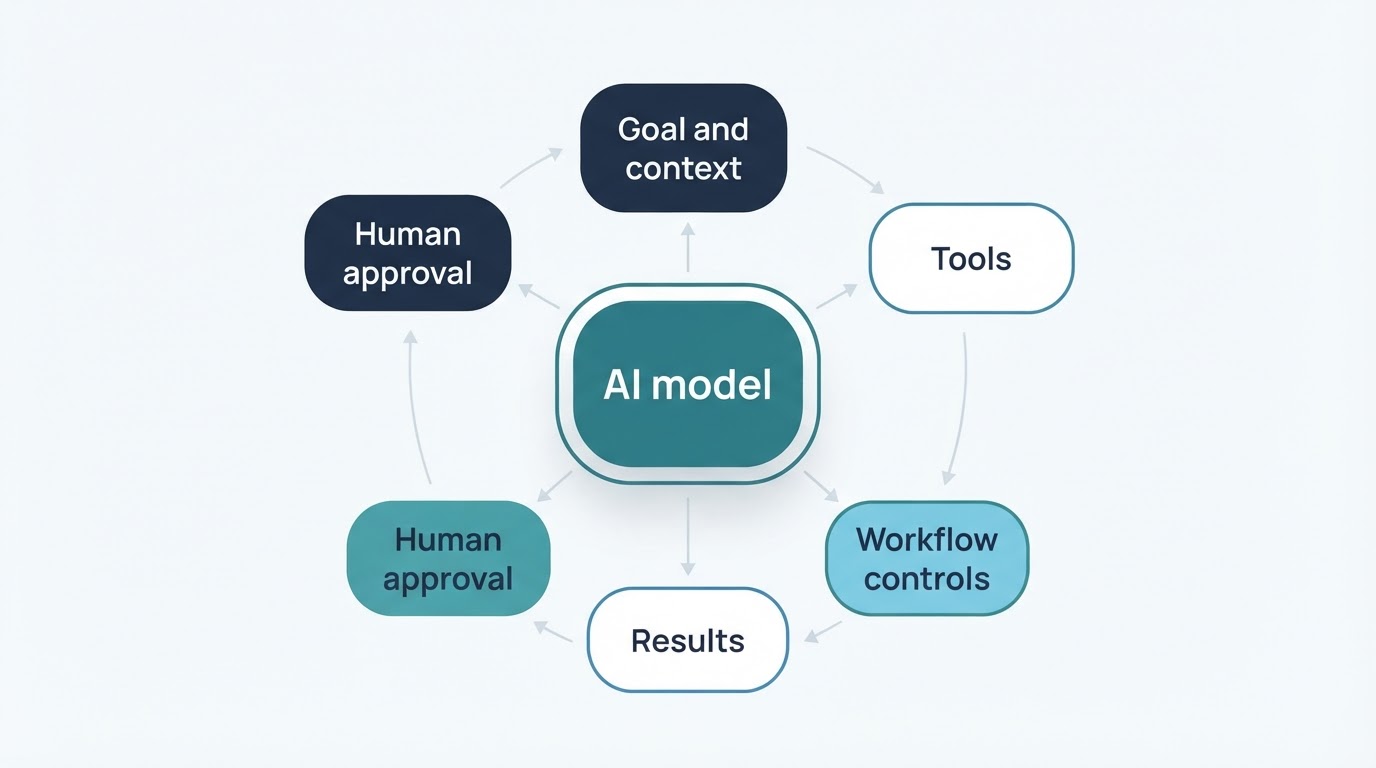
AI agents are software systems designed to pursue a goal by combining an AI model with instructions, context, tools, and a workflow for taking one or more steps. Instead of only generating a response, an agent may interpret a request, select an available action, use a connected tool, inspect the result, and continue or stop according to the application's design.
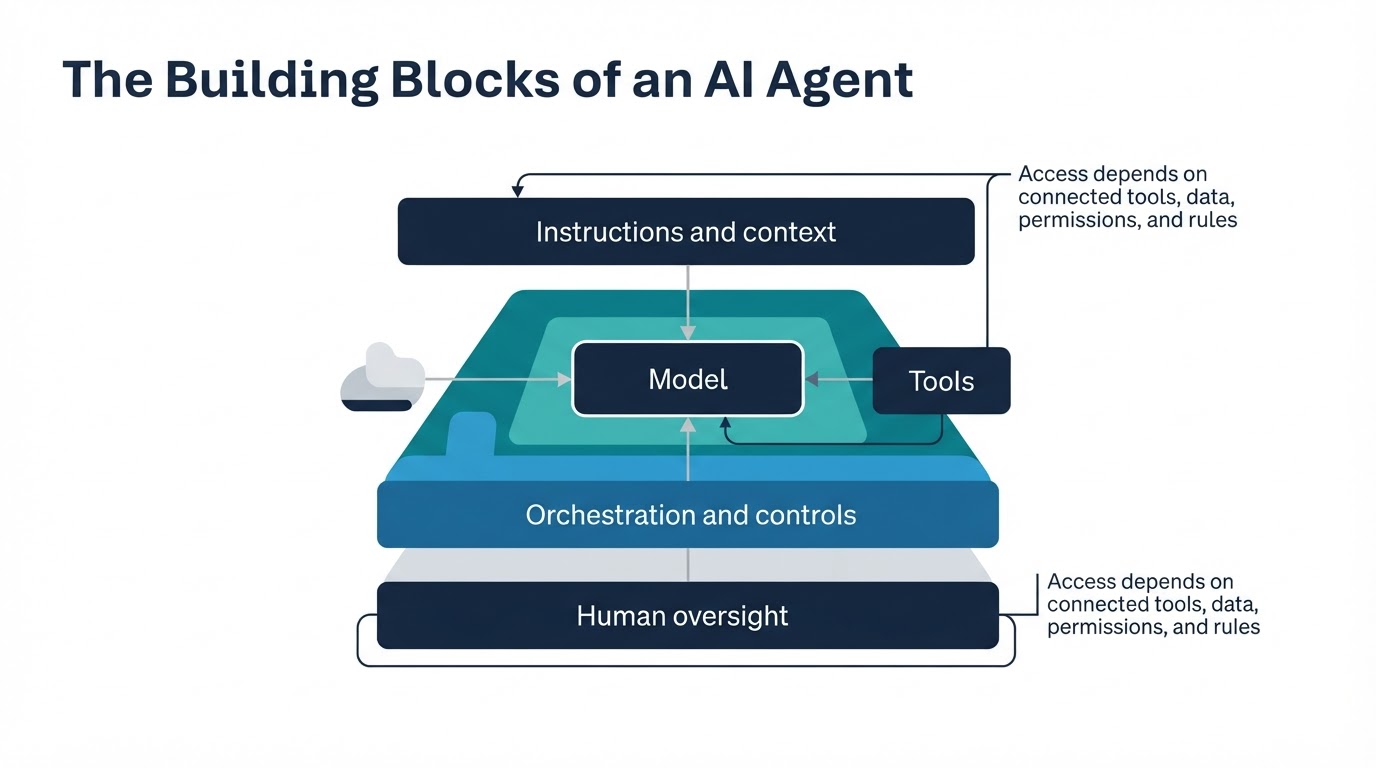
An agent is not automatically unrestricted or fully independent. Its practical abilities depend on the tools, data, permissions, approval rules, and stopping conditions provided by the surrounding application. One system may search a database but not edit it; another may prepare an email but require a person to approve it before sending.
This guide explains what AI agents are in plain English, how they work, how they compare with chatbots and traditional automation, what they can do, and how to evaluate their reliability, privacy, and security.
What Are AI Agents in Simple Terms?
An AI agent is a system that interprets a goal or request, uses available context, chooses actions or tools, and completes one or more steps toward a defined result.
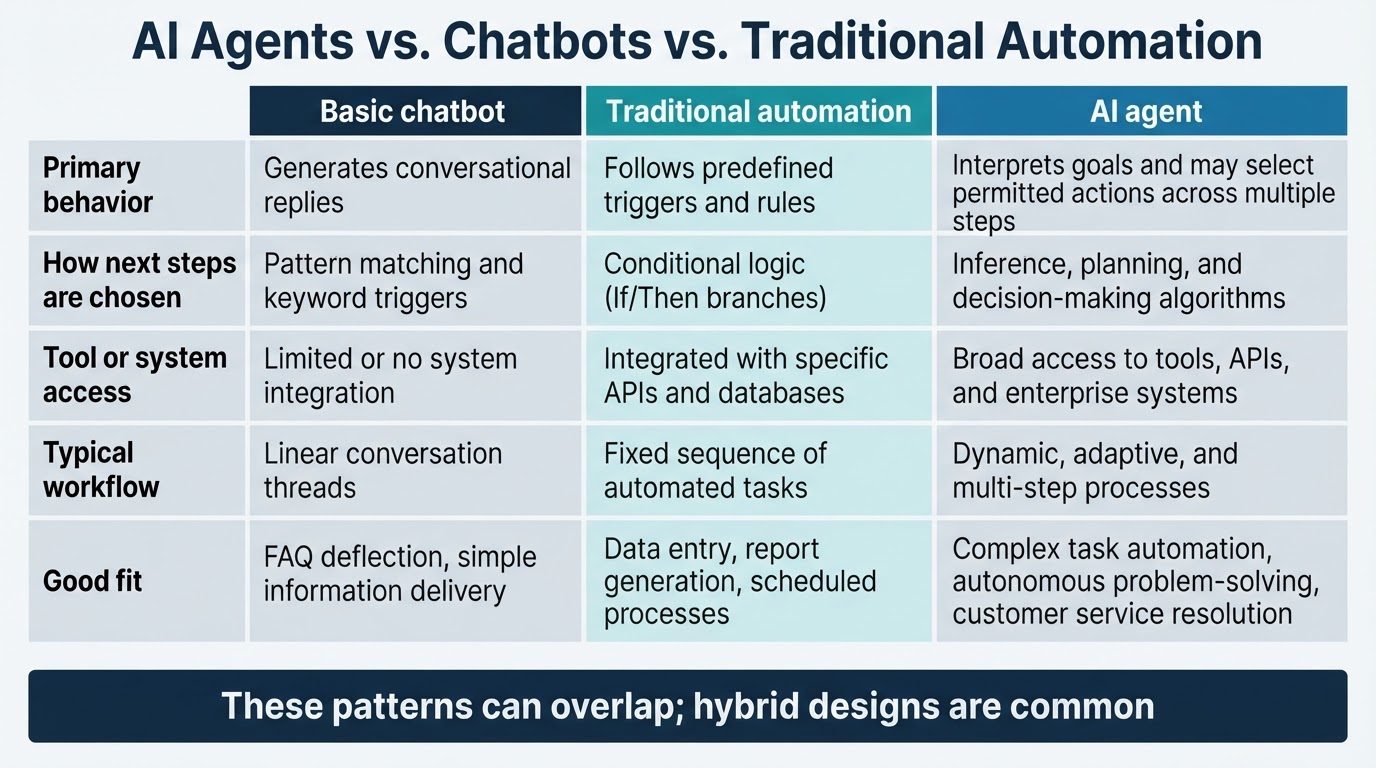
A conventional AI interface may answer a question or generate text in one turn. An agent can go further by deciding what may need to happen next. For example, a support workflow might retrieve an order record, check an approved policy, prepare a response, and escalate the case if it falls outside the system's permissions.
The term "AI agent" is used inconsistently. Some products use it for a tool-enabled assistant, while others use it for a more complex system that plans and executes multi-step tasks. Product labels alone do not prove that a system can use tools, retain state, act independently, or verify its own work.
How AI Agents Work: The Goal-to-Action Loop
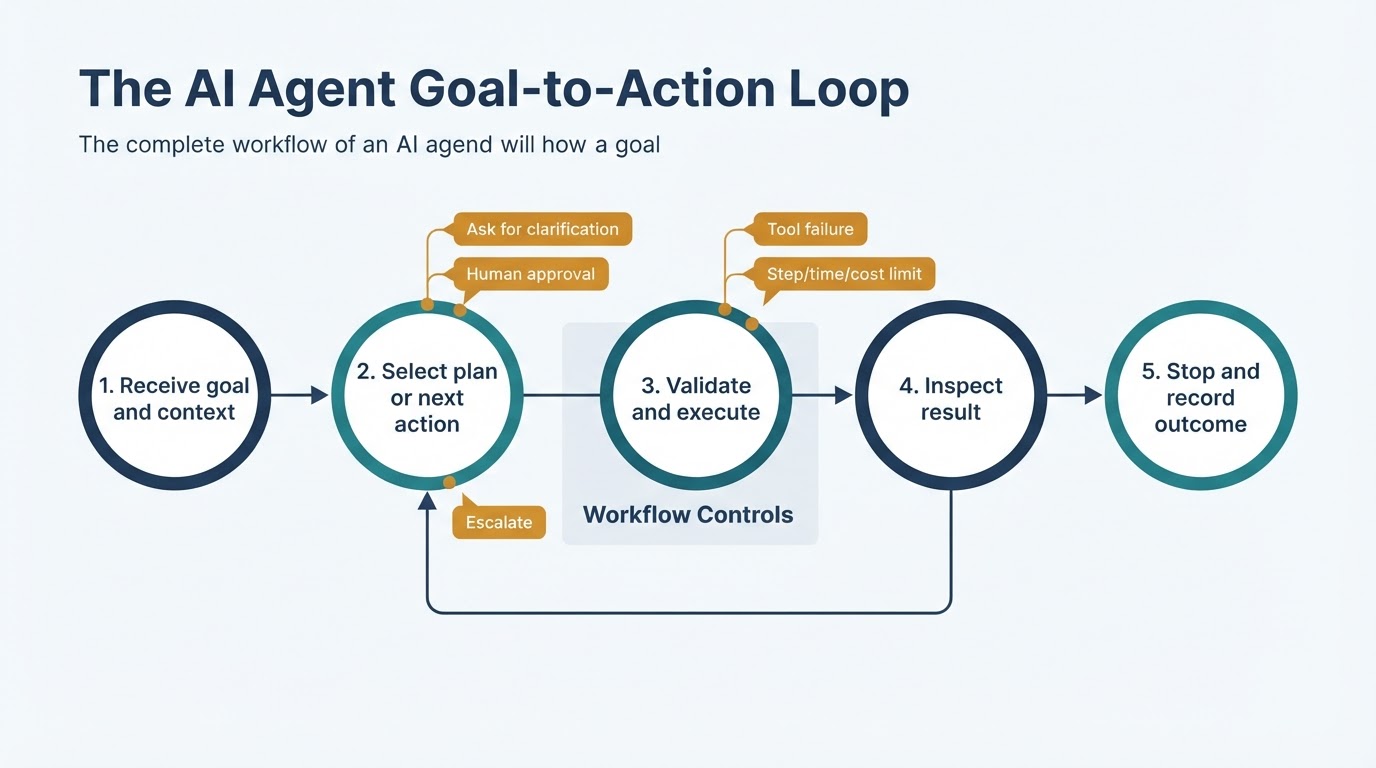
An AI agent is best understood as a controlled workflow rather than as a model working alone. The system receives a goal, selects a next step, uses an available tool, reviews the result, and either continues or stops.
The surrounding application determines which tools, APIs, data sources, and permissions are available. Depending on its design, an agent may ask for clarification, retry an operation, escalate to a person, or stop after reaching a configured limit. These are workflow features, not automatic properties of every agent.
A Worked Example: An Order-Support Agent
Consider a support system that helps investigate an order-status question. This example illustrates a possible workflow; it does not mean every support product works this way.
AI Agents vs. Chatbots, Assistants, and Traditional Automation
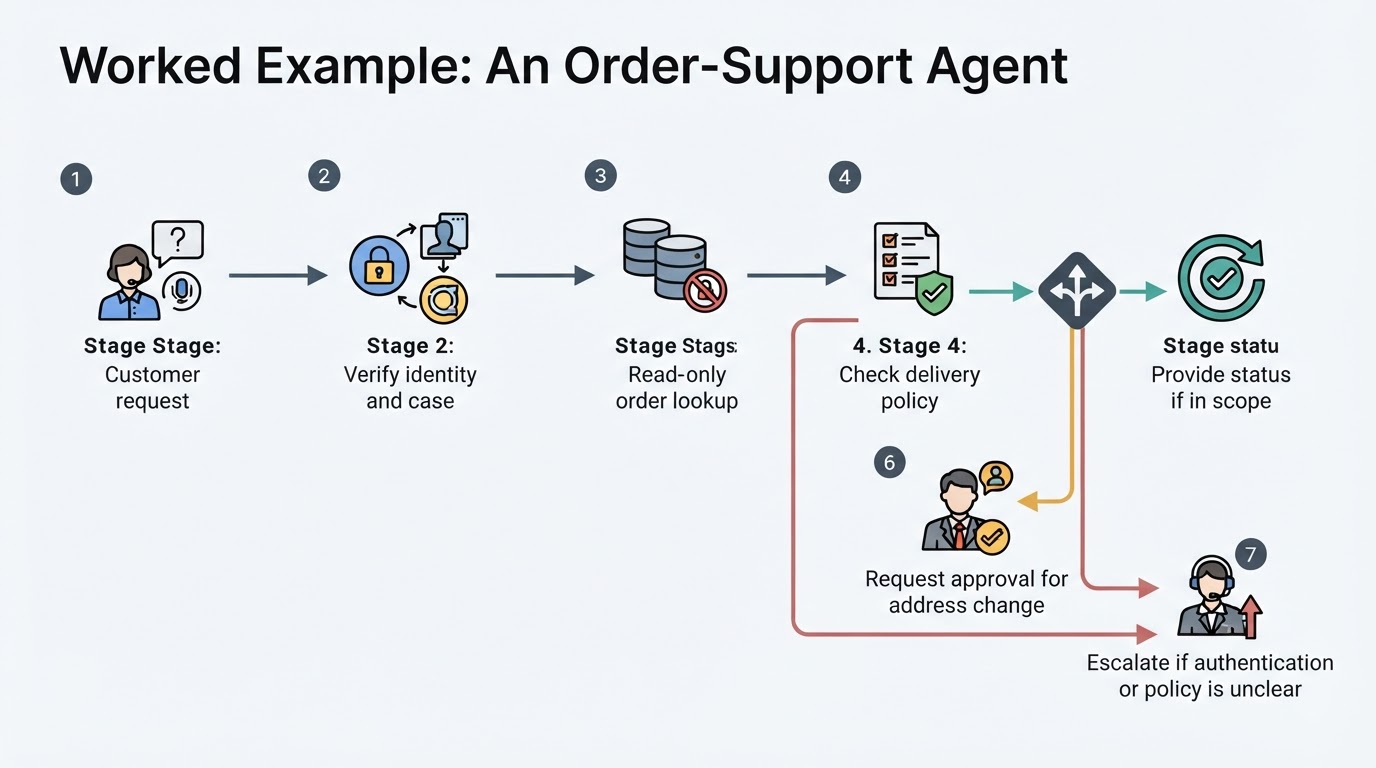
These terms overlap and are not strict industry categories. A chatbot is usually a conversational interface, an assistant is a broad user-facing label, and traditional automation commonly uses predefined rules and sequences. An agent typically adds goal-directed action selection, tool use, or multi-step execution.
What Can AI Agents Do? Practical Examples
AI agent examples range from read-only research to workflows that propose or execute changes. Each capability depends on connected tools, data quality, permissions, and controls. A read-only task is substantially different from an action that changes files, accounts, records, or external systems.
Tools, Memory, Planning, and Autonomy
Tool access is central to many agent workflows because an application cannot independently act in connected systems without functions, APIs, or other external capabilities. Planning may involve breaking a goal into steps, choosing an order of operations, or selecting only the next action.
Memory and autonomy are implementation choices, not universal requirements. A system may retain conversation history or task state, or it may receive the necessary context only for one task. Autonomy is better understood as a spectrum shaped by permissions, approval gates, sandboxing, budgets, and stop rules.
When Should You Use an AI Agent Instead of a Workflow?
An AI agent is not automatically the best solution. Consider one when inputs vary or contain ambiguity, several steps or tools must be coordinated, and the outcome can be evaluated. Deterministic automation may be better when rules are explicit, the process is stable, errors are costly, and every step can be specified in advance.
A chatbot or retrieval workflow may be enough when the main need is conversation, explanation, or information lookup without independent action. A hybrid design can place fixed controls around a smaller agent-controlled part of the process.
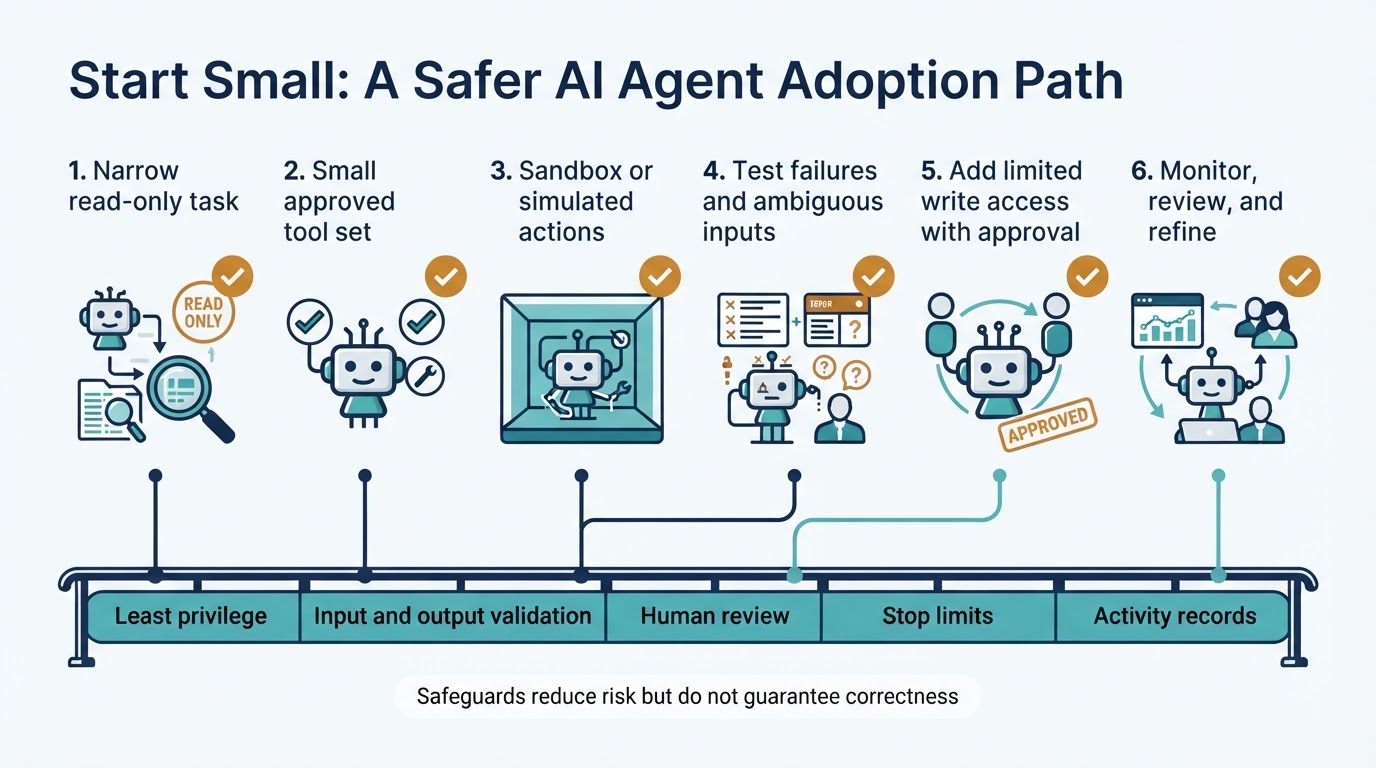
How to Build and Evaluate an AI Agent Workflow
A reliable implementation begins with the task, not with the assumption that an agent is required. Define the acceptable result, system boundaries, and conditions that require help from a person. Evaluate the complete workflow rather than only the quality of its final answer.
AI Agent Limitations, Privacy, and Security Risks
AI agents can produce incorrect conclusions, malformed tool arguments, unsupported text, or compounding errors because their outputs are not guaranteed to be correct. They also cannot perform actions that their tools, APIs, environment, or permissions do not expose.
Privacy and security depend on the complete deployment: the model and tool providers, integrations, configuration, authentication, logging, retention settings, and connected systems. Least privilege, validation, sandboxing, and human approval can reduce risk, but they do not eliminate model errors, compromised credentials, vulnerable tools, data leakage, or every form of attack.
Conclusion
An AI agent is best understood as a controlled system that connects a model to context, tools, and a workflow for pursuing a goal. Its practical distinction from a chatbot or traditional automation is the ability to interpret variable inputs, select permitted actions, use tools, inspect results, and continue or stop.
The strongest use cases combine changing inputs, multiple steps, tool coordination, and measurable outcomes. Even then, permissions, validation, human review, monitoring, and clear stop conditions reduce risk without guaranteeing correct behavior. For stable and explicit processes, deterministic automation may remain the simpler choice.