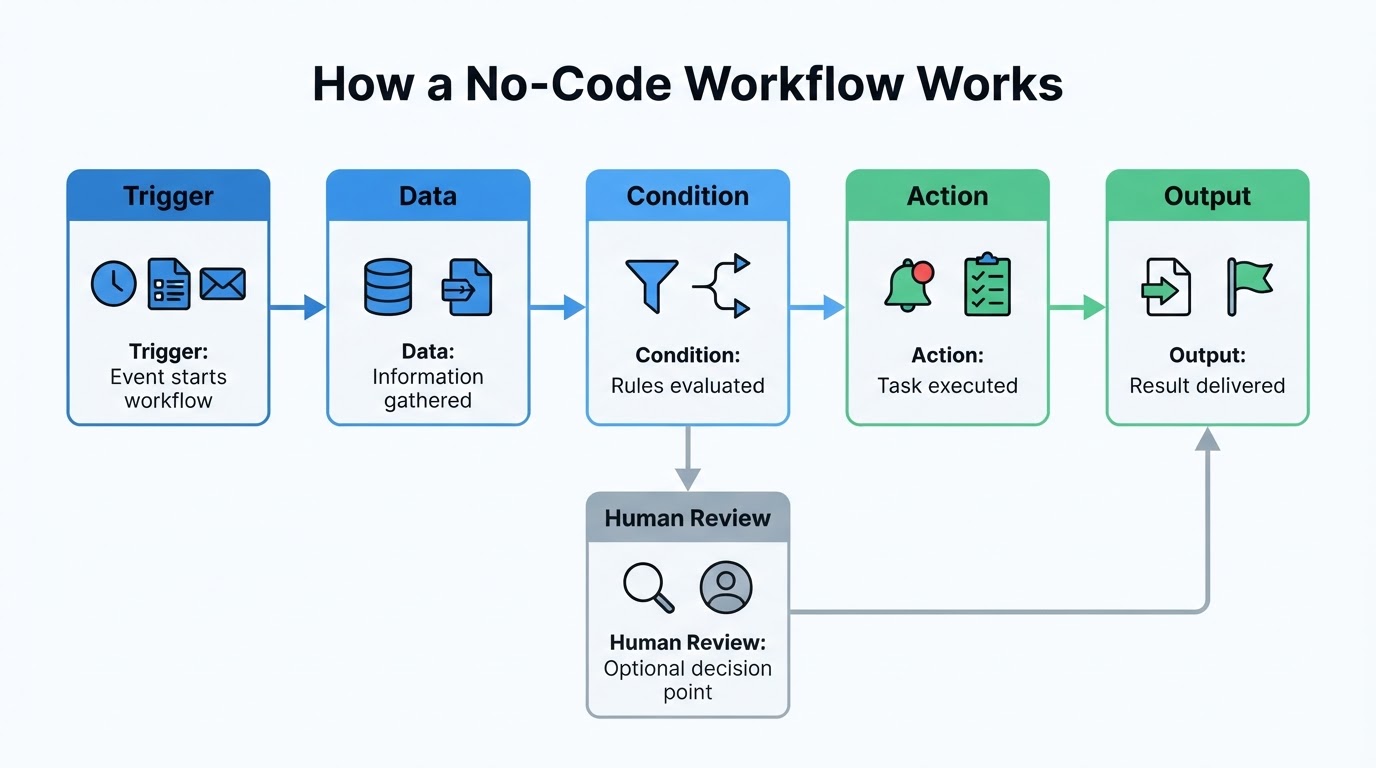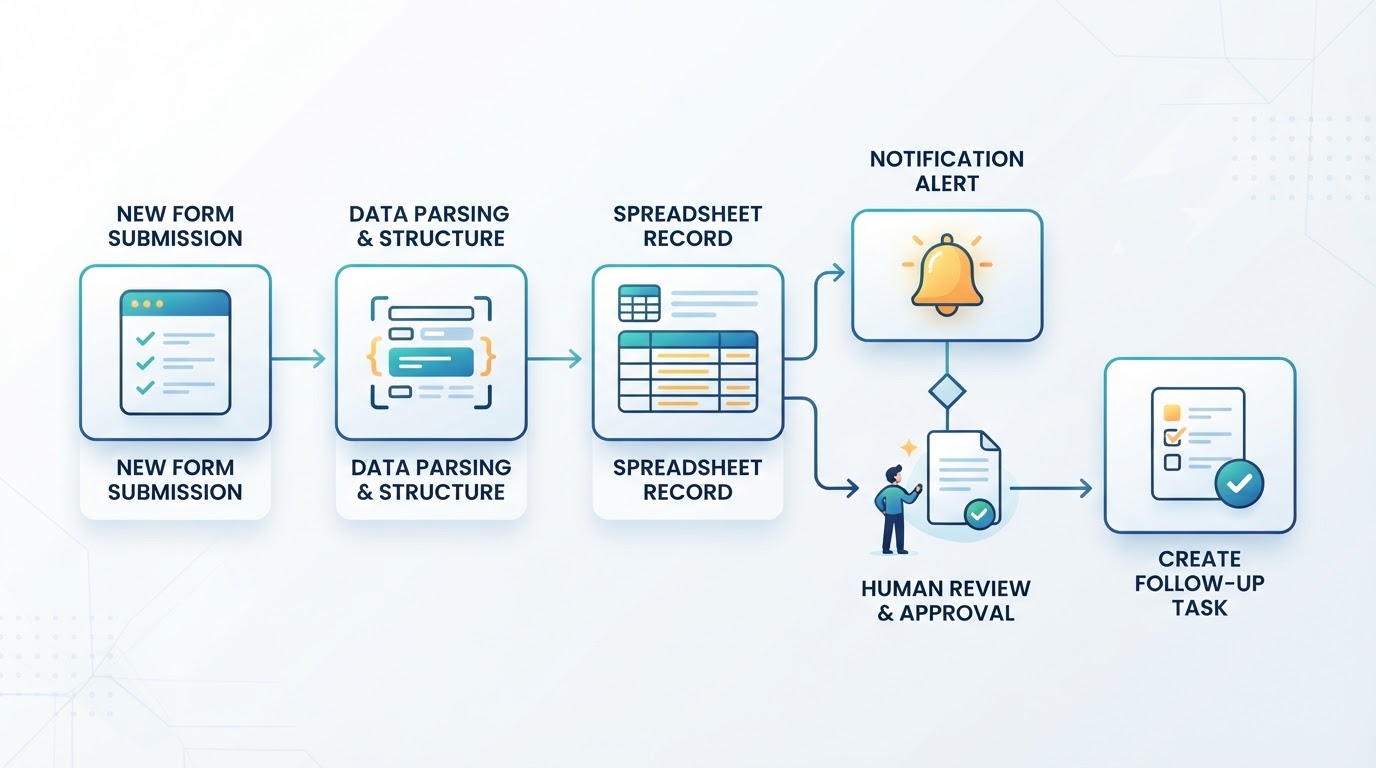
No-code automation lets you connect apps and move information between them without writing conventional software code. A typical workflow starts with a trigger, such as a form submission, new email, scheduled time, or uploaded file. It then performs one or more actions, such as creating a record, sending a notification, or assigning a task.
The visual setup is approachable, but successful automation still requires process design. You need to understand the task, identify the required data, review permissions, test realistic scenarios, and decide what happens when something goes wrong. No-code tools reduce programming work; they do not remove the need for clear rules and responsible oversight.
The safest way to begin is with one small, repeatable, low-risk task. Build the basic trigger and action first. Once that version works reliably, add conditions, branches, approvals, or an AI step only when they solve a specific problem.
A Quick Workflow for Building No-Code Automation
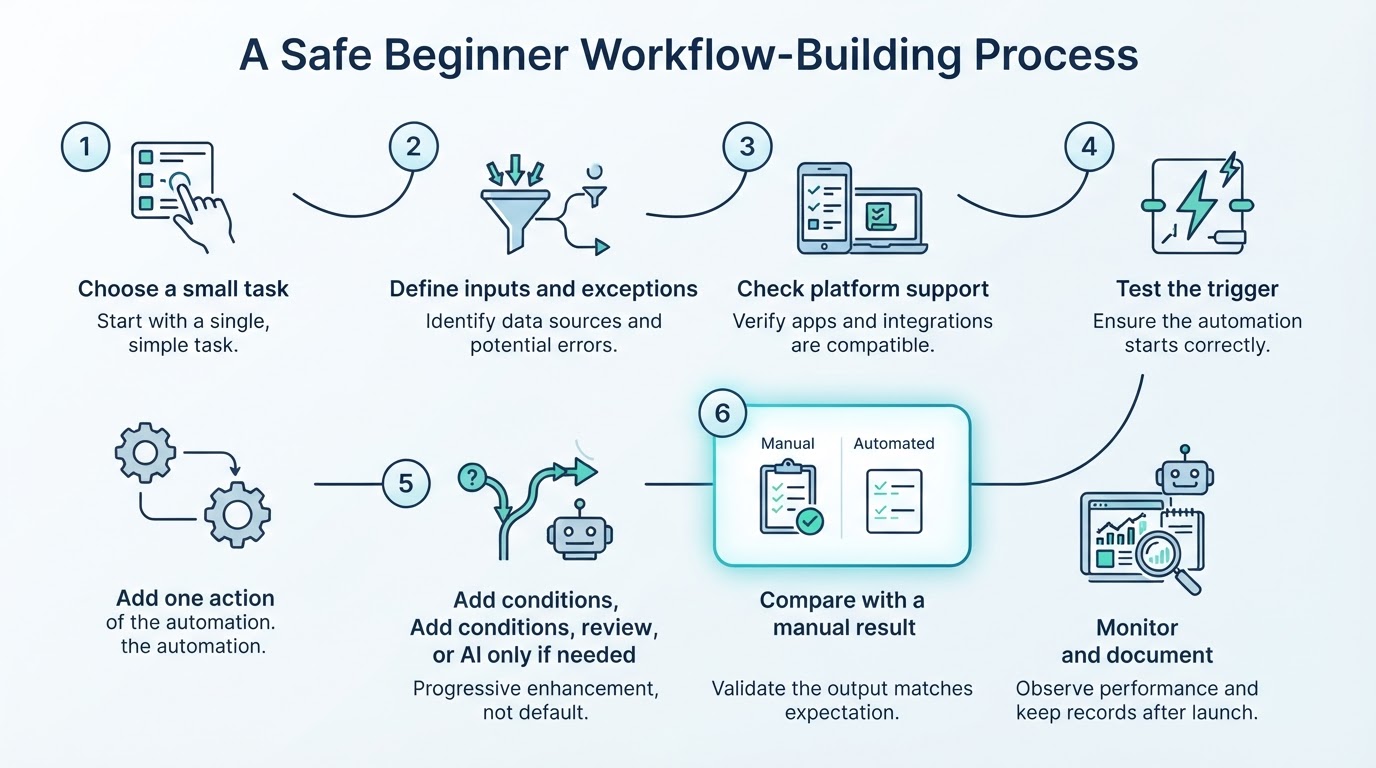
A practical no-code automation process looks like this:
- Choose a small, repeatable task with a clear beginning and end.
- Write down the trigger, required inputs, expected output, and exception cases.
- Confirm that the selected platform supports the required apps and steps. Features such as branches, approvals, webhooks, retries, execution history, and usage limits vary by platform and plan.
- Test the trigger with safe sample data.
- Add one action and map the required fields.
- Compare the result with a manually completed example.
- Add filters, branches, validation, approval, or an AI step only when needed.
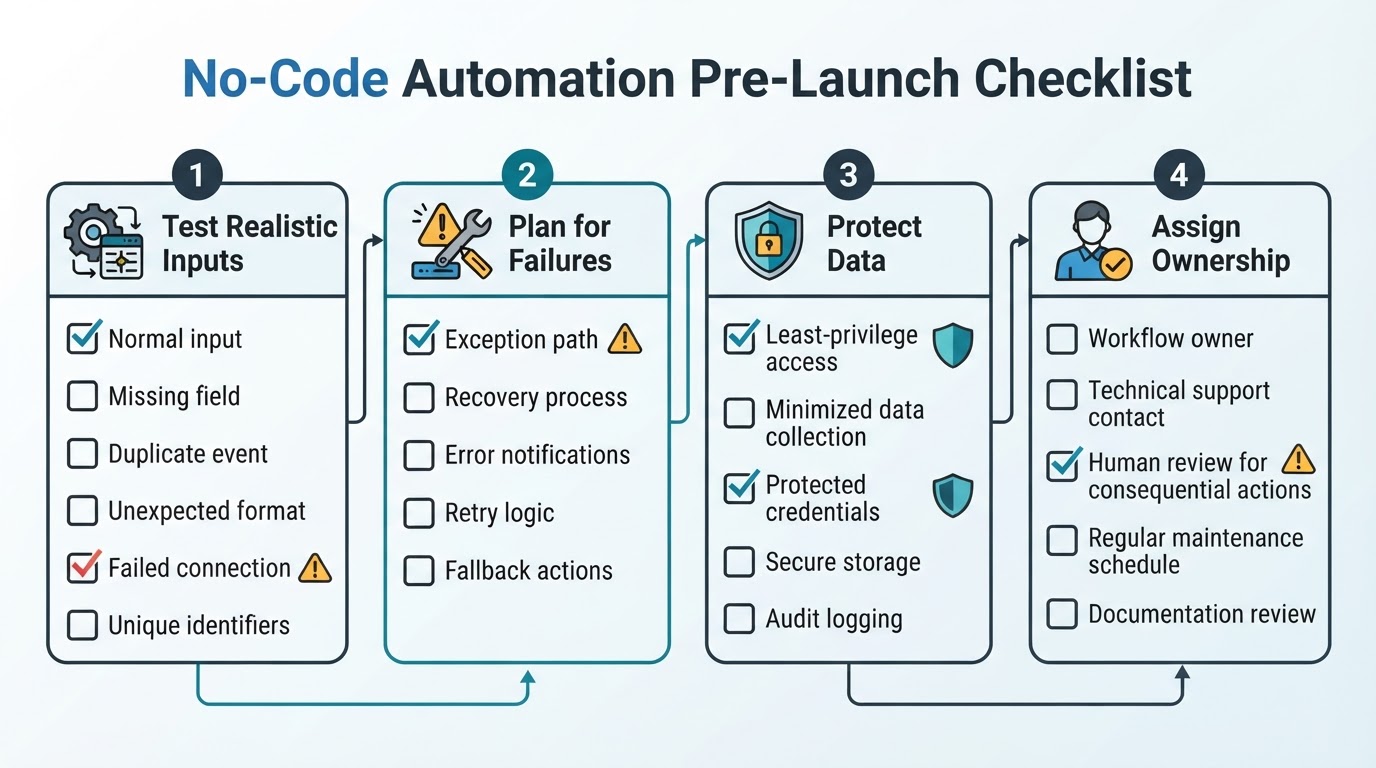
- Test normal, incomplete, duplicate, and unexpected inputs before using live data.
- Monitor the workflow and document its owner, permissions, and recovery process.
This sequence is a general design method, not a guarantee that every platform provides the same buttons or features. Follow the selected provider's documentation for testing, activation, error handling, credentials, and plan restrictions.
What Is No-Code Automation?
No-code automation is the creation of software workflows primarily through visual interfaces, forms, templates, and configuration instead of conventional programming. You select a starting event, connect services, map fields, and define what should happen next.
The concept includes several related approaches:
- Automation: A system performs a task with limited manual involvement.
- Workflow automation: Multiple steps are connected so that one event leads to a sequence of actions.
- No-code automation: The workflow is built mainly through visual configuration rather than writing code.
- Low-code automation: Visual configuration is combined with optional code or more technical customization.
- AI-assisted automation: An AI feature is included as one step, such as summarizing, classifying, extracting, transforming, or drafting content.
No-code does not mean no planning. You still need to define inputs and outputs, understand exceptions, review permissions, and check the quality of results. A workflow that is easy to assemble can still create duplicate records, expose unnecessary data, or apply the wrong rule.
Which Tasks Should You Automate First?
The best first automation is usually frequent, repeatable, rule-based, and based on reasonably clear inputs and outputs. Start with a task that has a defined beginning and end and whose result can be compared with a manual example.
Consider these factors when choosing a task:
- How often it occurs
- How much manual effort each occurrence requires
- How predictable the steps are
- How sensitive the data is
- What could happen if the workflow makes a mistake
- Whether a person can easily review the result
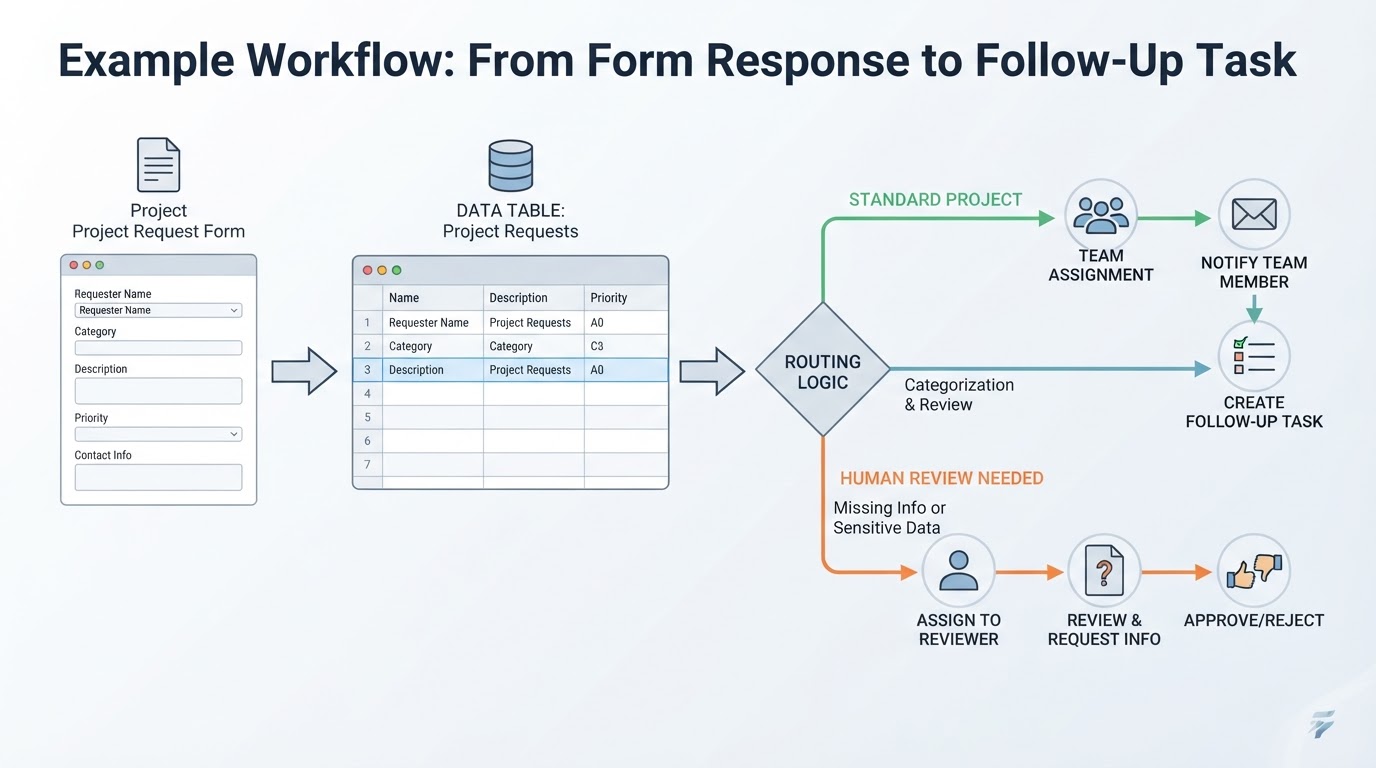
A low-risk task such as routing a form response, creating a reminder, or recording a structured update is usually a better starting point than an automated decision involving legal, financial, medical, employment, safety, privacy, or reputational consequences.
Map the Workflow Before You Build It
Before opening an automation platform, write the current manual process in plain language. This prevents a common mistake: configuring steps before deciding what the workflow is supposed to accomplish.
Record the trigger, inputs, actions, conditions, output, exception path, and owner. Also note what should happen when data is missing, duplicated, malformed, delayed, or outside the normal process.
A simple document or table is enough. The purpose is to make the process understandable before you configure it.
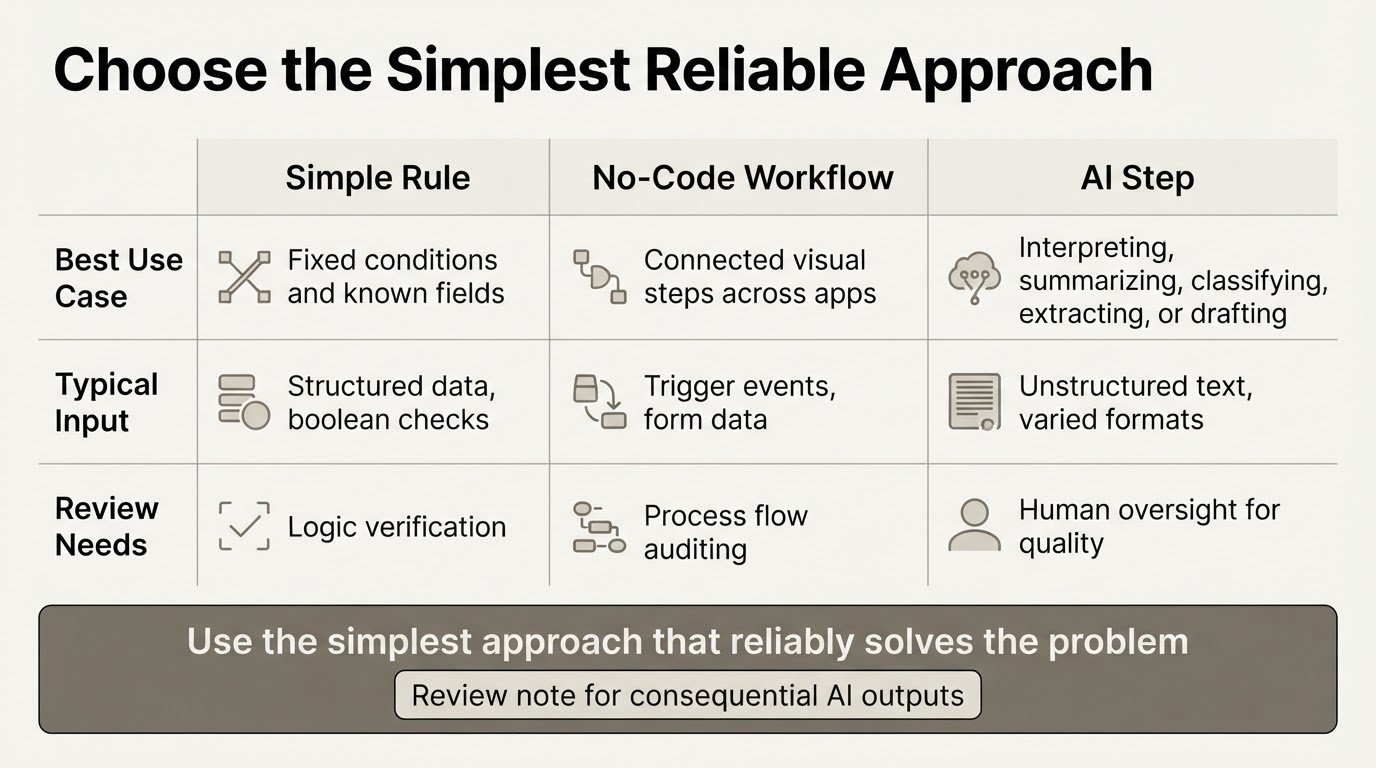
Choose the Right No-Code Automation Approach
There is no universally best automation platform or workflow style. Choose based on the services you need to connect, process complexity, budget, data controls, hosting requirements, AI needs, and technical comfort.
Common categories include connector-based automation services, database-centered workflow builders, self-hosted tools, and more technical low-code systems. The important differences are usually integration coverage, hosting and governance options, customization, access controls, maintenance requirements, and the technical knowledge needed to operate the system.
Before committing to a platform, check whether it supports the required triggers, actions, filters, branches, approvals, webhooks, credentials, and execution history. Confirm whether each feature is available on your plan. Also review pricing, execution limits, file restrictions, authentication options, retention information, and maintenance requirements in the provider's current documentation.
How to Create an Automated Workflow Without Coding
Build the smallest useful version first, then add complexity one component at a time. The names of buttons, testing controls, and activation steps differ between platforms, so use the selected provider's documentation alongside this general method.
Use synthetic or otherwise safe sample data during initial testing. Avoid connecting sensitive live information until you understand what the workflow sends, stores, and produces.
Practical No-Code Automation Examples
The following patterns are illustrative examples, not guarantees of a particular result or amount of time saved. Each uses the same basic model: identify a trigger, check or transform the data, perform an action, and define what happens when the workflow is uncertain.
Test, Monitor, and Troubleshoot the Workflow
A workflow is not finished when it runs once. Test normal, incomplete, unexpected, duplicate, and deliberately problematic inputs before activation. After launch, monitor the controls and history that the selected platform provides, along with errors, skipped paths, output quality, and usage limits.
Failure behavior varies. Depending on the platform, connector, plan, and error type, a failed step may stop the workflow, retry, produce a partial result, appear in execution history, or require manual recovery. Verify the provider's documented logging, retry, and recovery behavior before relying on the workflow for important work.
Document the workflow owner, connected accounts, permissions, expected outputs, and recovery process so another person can understand what to do if it stops working.
Privacy and Security for No-Code AI Workflows
Connected workflows can move information between multiple services, so review privacy and security before activation. For each connected app and AI provider, check what data it receives, where it is processed, how long it may be retained, whether it may be used for service improvement, and which controls apply to your account or plan. Consult the provider's current privacy policy, data-processing terms, retention documentation, and organizational requirements.
Apply data minimization: pass only the fields required for the task and mask sensitive information when possible. Use the least-privilege connection available, and review connected-app access periodically.
Protect API keys, OAuth credentials, webhook URLs, and service-account credentials. Do not place them in prompts, shared spreadsheets, screenshots, or logs. Treat workflow exports as potentially sensitive and check the provider's documentation to determine whether exports contain references, masked values, configuration details, or usable secrets. Treat incoming emails, documents, webpages, and other external text as untrusted input; they should not override workflow instructions or independently authorize consequential actions.
Limitations, Maintenance, and When No-Code Is Not Enough
No-code automation cannot compensate for inaccurate, incomplete, duplicated, or poorly structured source data. It can also fail when connected apps change interfaces, field names, authentication methods, permissions, or API behavior.
Other limitations may include execution quotas, rate limits, plan restrictions, file limits, and unavailable integrations. These vary by platform and subscription, so confirm the current terms before relying on a workflow.
AI adds another source of uncertainty. Its output may be incomplete, incorrect, inconsistent, or poorly formatted when instructions or source data are ambiguous. Complex workflows with many branches, hidden dependencies, duplicated logic, or unclear ownership also become harder to maintain.
Review a workflow after connected apps, credentials, business processes, or data requirements change. Maintenance is part of responsible automation.
Conclusion
No-code automation works best when it connects a clear trigger to predictable actions and includes appropriate conditions, exception handling, testing, and ownership. Start with one small, low-risk workflow, use representative test data, and confirm the selected platform's capabilities and limits before relying on it.
AI can assist with summarization, classification, extraction, and drafting, but consequential outputs should be checked against their source context before final action. Good automation depends on clear processes, suitable data, least-privilege access, provider-specific privacy review, and ongoing maintenance.