
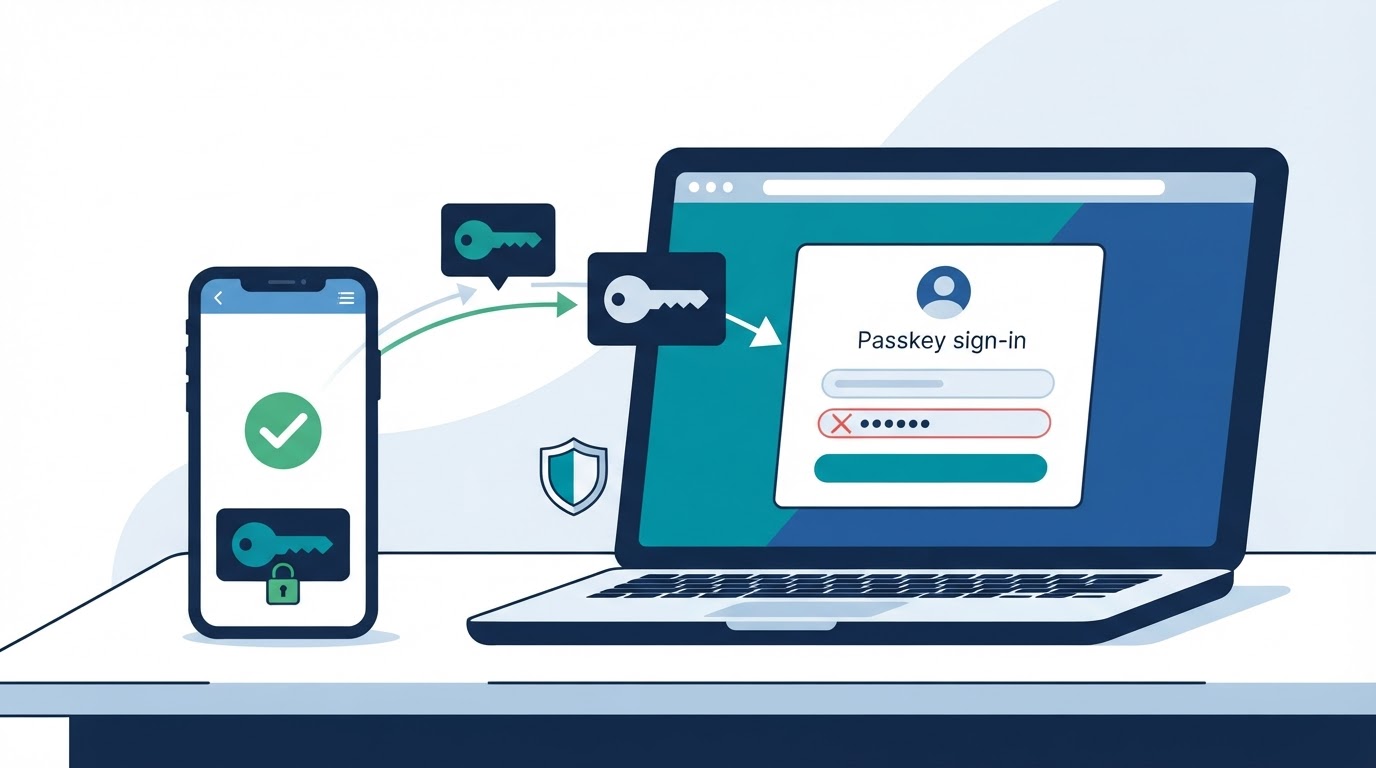
A passkey is a FIDO authentication credential designed to reduce or replace password-based sign-in. Instead of typing a reusable password, you approve sign-in with a phone, computer, credential manager, or compatible FIDO security key.
Passkeys use public-key cryptography. The service stores a public key, while the corresponding private key remains protected by an authenticator or passkey provider. During sign-in, you usually approve the action with a device PIN, password, fingerprint, face scan, pattern, or security-key interaction.
This design can make authentication more resistant to traditional phishing and password reuse. It does not secure every part of an account, however. Device protection, provider-account security, fallback methods, active sessions, and recovery planning still matter.
What Is a Passkey in Simple Terms?
A passkey is a service-specific FIDO credential that lets you sign in without typing a traditional password. It is stored or managed by an authenticator such as a phone, computer, credential manager, or compatible hardware security key.
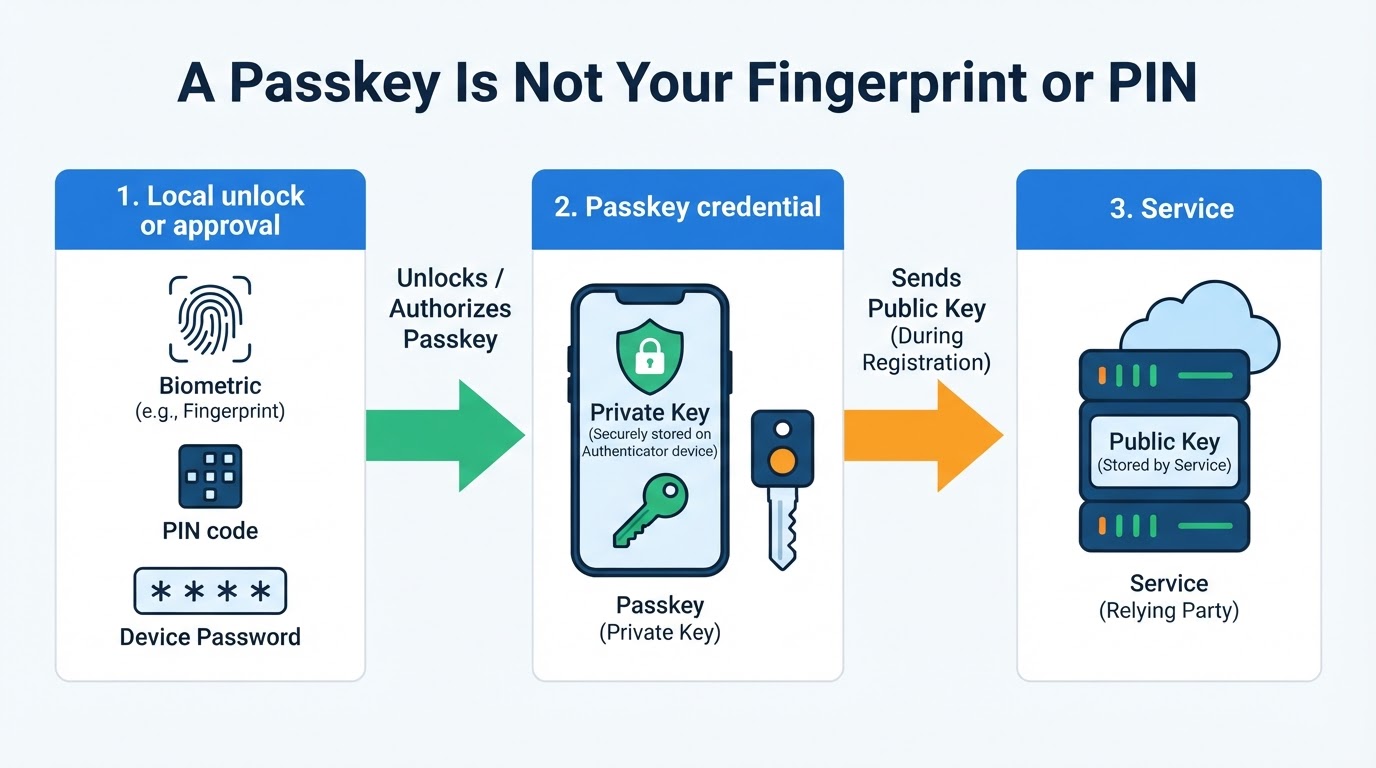
A passkey is not a fingerprint, face scan, PIN, device password, or pattern. Those methods locally unlock or authorize the authenticator. The passkey is the cryptographic credential that proves to the service that the authenticator has the correct private key.
How Do Passkeys Work?
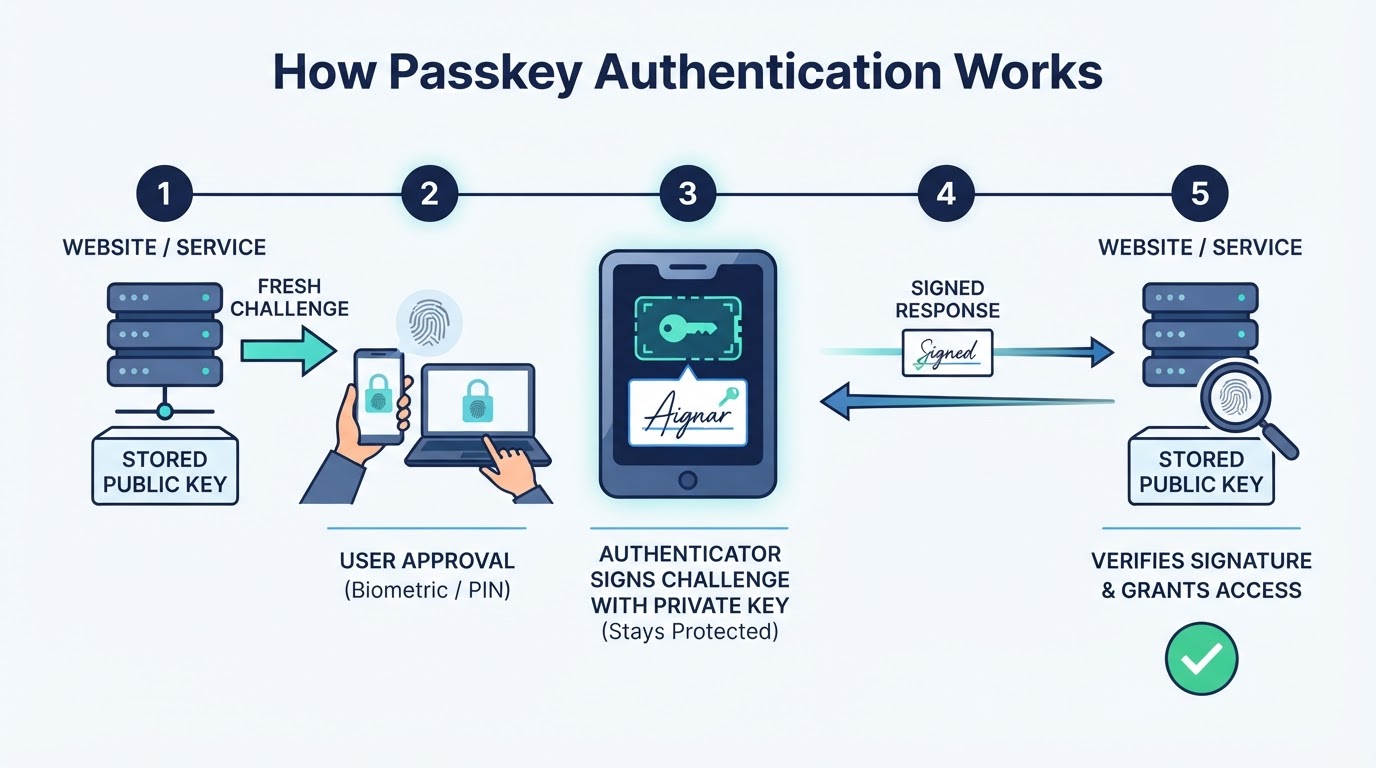
Passkeys use public-key cryptography and a challenge-response exchange. The service sends a fresh challenge, and the authenticator signs it with the private key after you approve the action. The service verifies the signature with the registered public key.
Are Passkeys Secure?
Passkeys are designed to reduce several weaknesses associated with passwords. They use service-specific credentials, avoid requiring users to type a reusable secret into a login form, and can require local user verification.
A correctly implemented passkey flow can provide strong resistance to traditional phishing because the credential is bound to the service's relying-party identity. This protection applies to that passkey flow, not automatically to every way of accessing the account.
Passkeys are not an absolute guarantee against account compromise. Malware, compromised devices, malicious browser extensions, social engineering, active sessions, provider-account compromise, and weak recovery methods can still create risk.
Passkeys vs. Passwords, MFA, and Security Keys
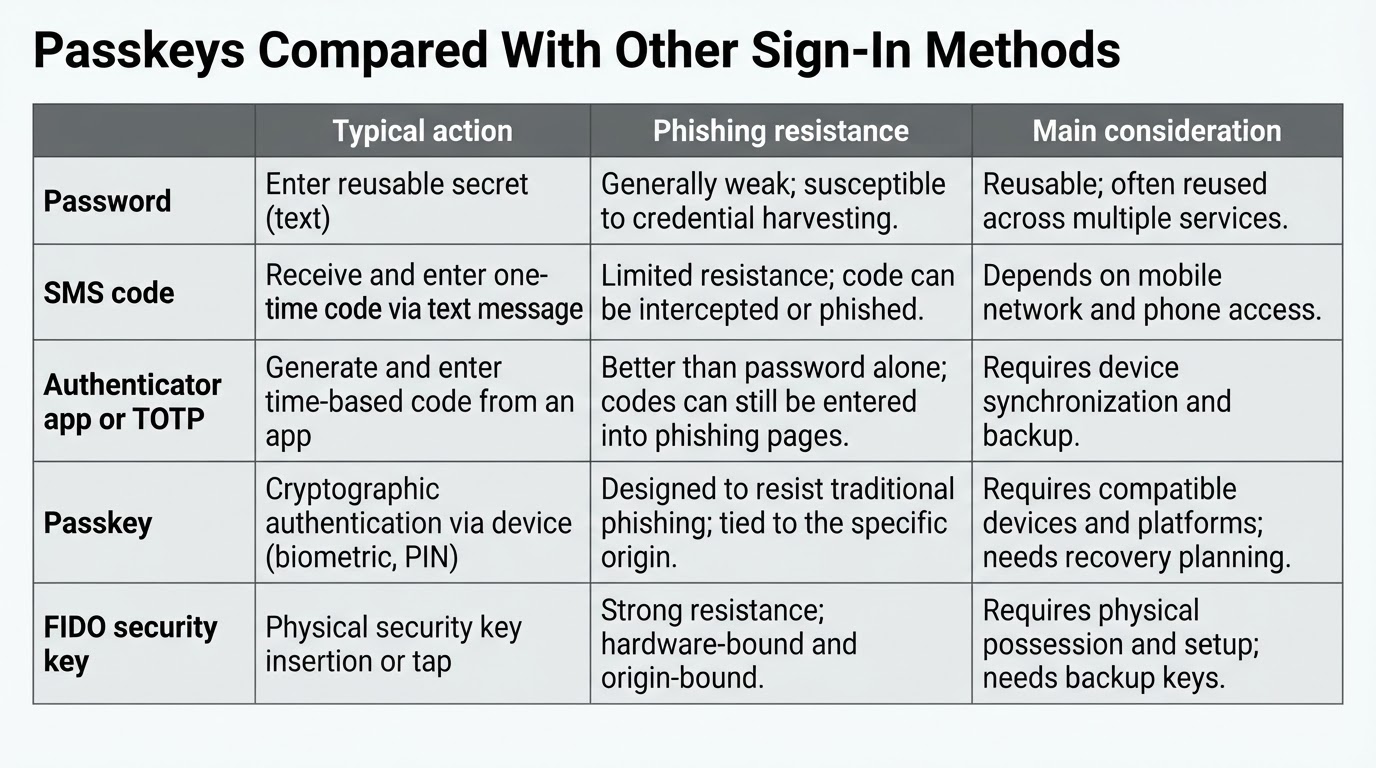
Passkeys overlap with other authentication methods, but they are not identical to them. The right choice depends on the service, account value, device security, recovery options, and the level of control or portability you need.
| Method | Typical process | Phishing resistance | Main considerations |
|---|---|---|---|
| Password | Enter a reusable secret | Generally low | Can be reused, guessed, captured, or stolen |
| SMS code | Enter a code sent to a phone number | Limited | Depends on phone access and the security of the recovery route |
| Authenticator app or TOTP | Enter a time-based code | Better than a password alone, but codes can still be entered into phishing pages | Requires access to the authenticator and a recovery plan |
| Passkey | Approve a cryptographic credential locally | Designed to resist traditional phishing | Requires compatible service, authenticator, and recovery planning |
| FIDO security key | Approve a credential on a physical key | Designed to resist traditional phishing | Requires compatible hardware and a plan for loss or replacement |
Service configuration, device security, and recovery policy affect the result for every method.
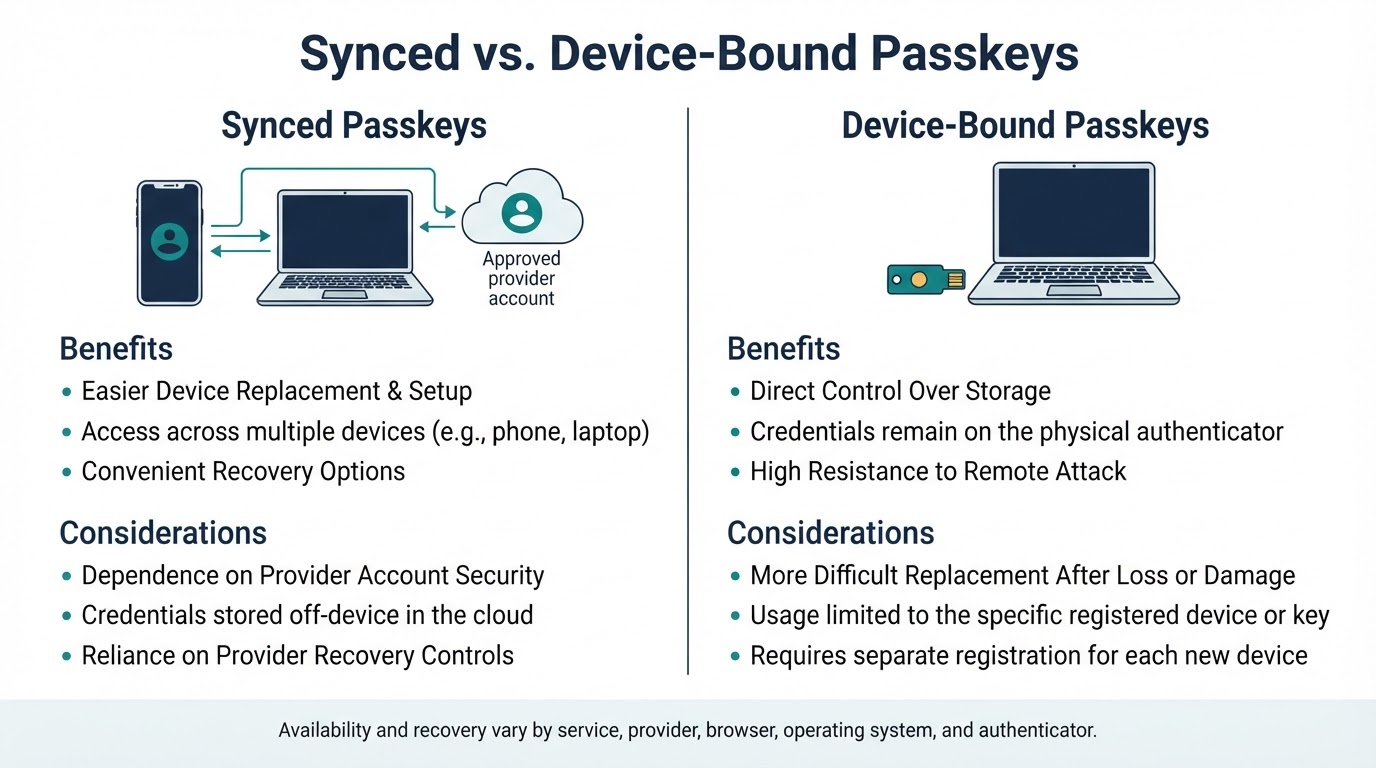
Synced vs. Device-Bound Passkeys
Passkeys can be stored and managed in different ways. A synced passkey is made available across approved devices through a passkey provider's synchronization system. A device-bound passkey remains with a particular authenticator, such as a compatible security key, and is not designed to synchronize through a provider.
Synchronization, encryption, device enrollment, account authentication, and recovery are implemented by individual providers. Do not assume that all providers use identical protections or recovery processes. A synced passkey can simplify device replacement but increases dependence on the provider's account and recovery controls. A device-bound credential can provide more direct control over where the credential exists, but loss or damage may make replacement more difficult.
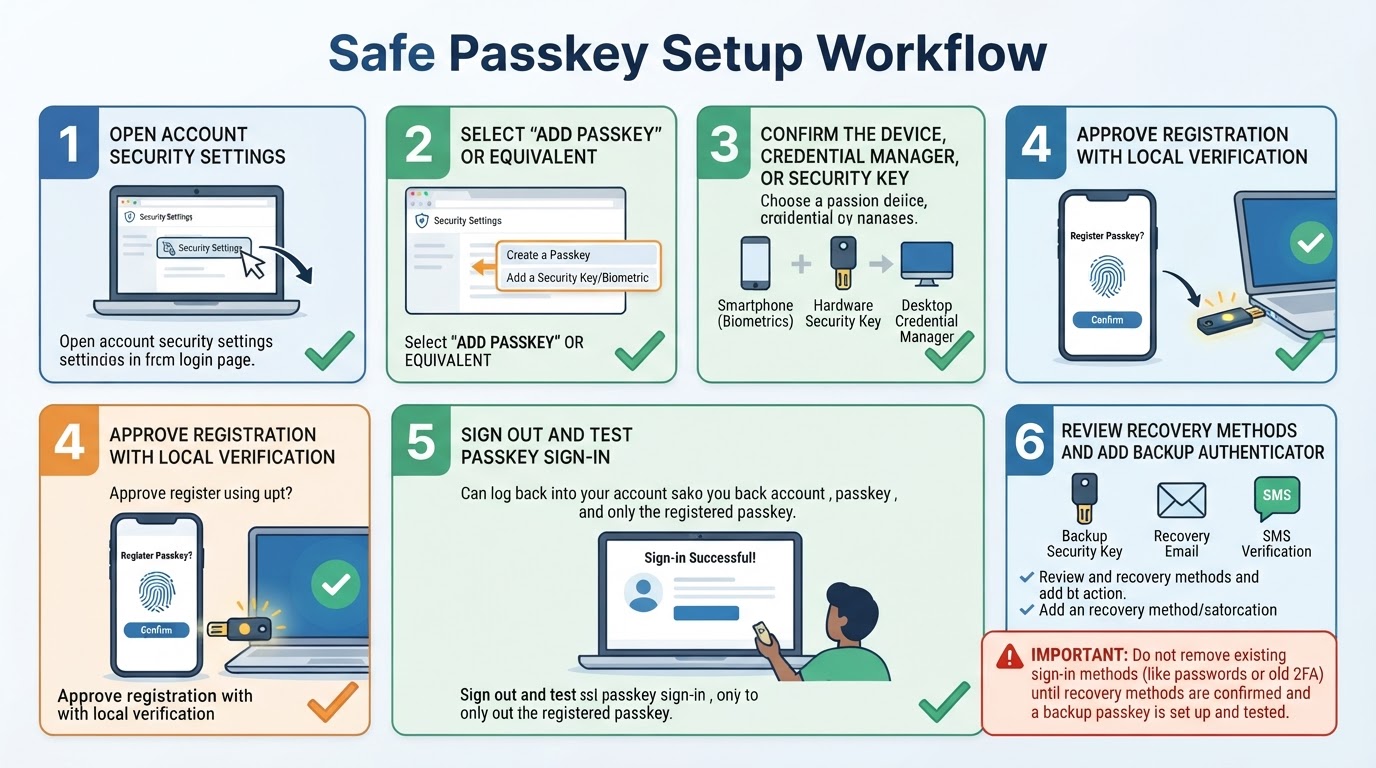
How to Create and Use a Passkey
Passkey setup is provider-dependent. Menu names, enrollment requirements, user-verification prompts, credential naming, cross-device options, and removal controls vary by service, browser, operating system, credential provider, and security key. Use the service's current official instructions rather than treating the following sequence as a universal interface procedure.
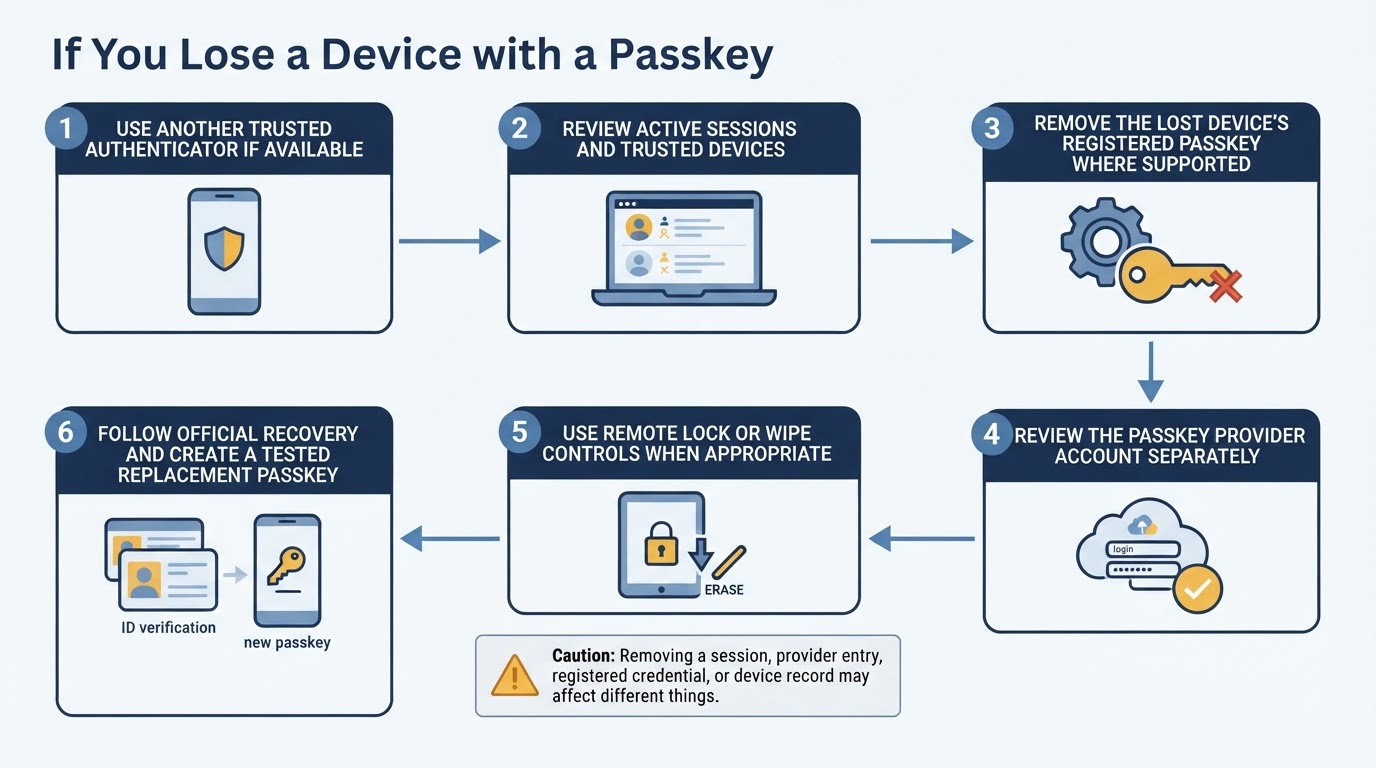
Passkey Recovery and Device Loss
Recovery depends on how the credential is stored and what alternatives the service supports. A lost device may be less disruptive when a passkey is synchronized or when another authenticator is available. A device-bound credential may require a backup key or the service's official recovery process.
Before relying on a passkey, identify the recovery options and evaluate their security. Backup codes, passwords, SMS, email recovery, and support-assisted recovery are not equivalent. Each enabled method affects the account's effective security level.
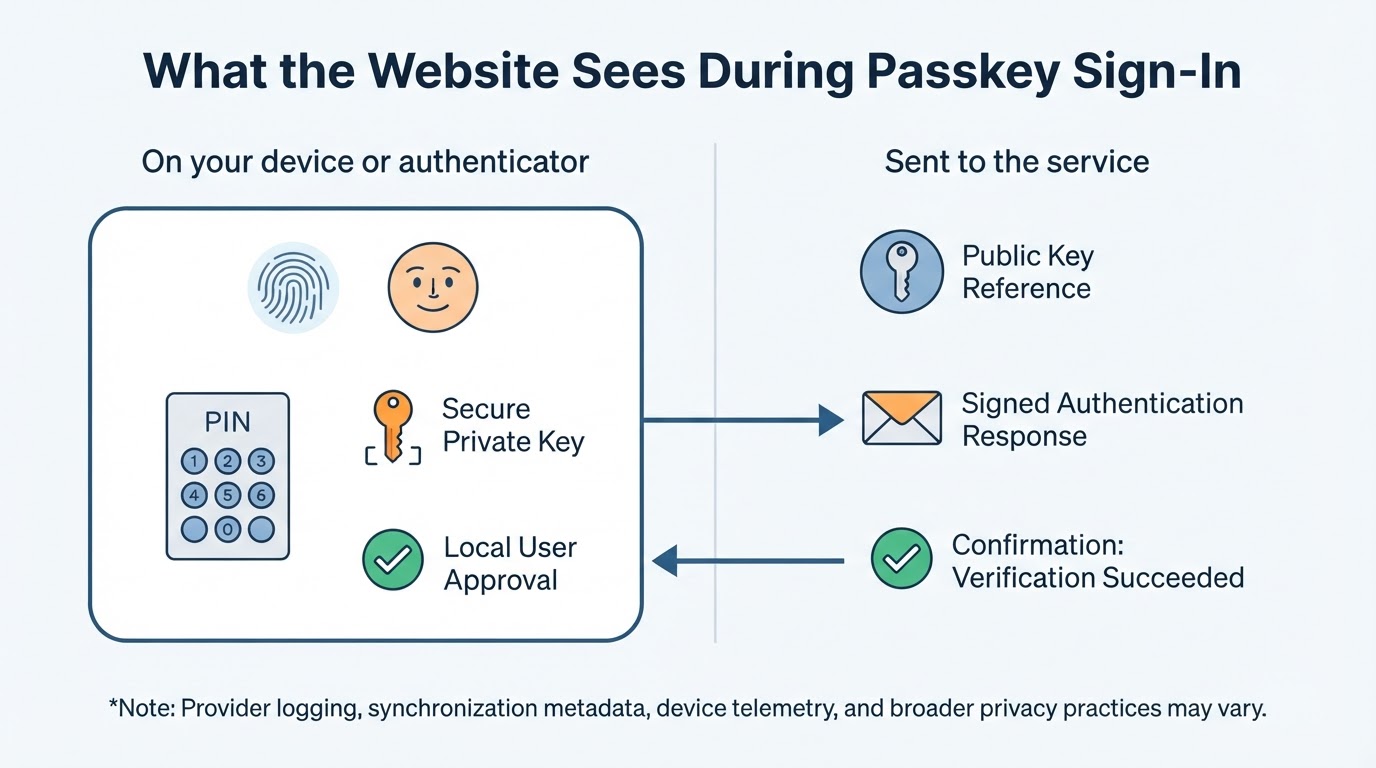
Passkey Privacy: What Does the Website See?
During normal passkey authentication, the website receives the public-key credential and authentication result needed to verify the signed challenge. It does not receive the private key as part of the normal flow.
For standard FIDO user verification, biometric processing is designed to remain on the device or authenticator, and the relying party generally receives an indication that verification succeeded rather than the biometric itself. This protocol-level behavior does not describe every type of device telemetry, provider logging, synchronization metadata, account-recovery data, or broader privacy practice.
Synchronization and biometric handling are separate issues. Review the relevant device, passkey-provider, and service privacy documentation before choosing a provider.
Common Passkey Mistakes to Avoid
Avoid these assumptions:
- Creating a passkey automatically disables the account password or every fallback method.
- A fingerprint, face scan, PIN, or device password is the passkey itself.
- Every passkey synchronizes across every platform and provider.
- A synced passkey has identical encryption, recovery, and enrollment behavior across providers.
- A compatible security key is the same as every generic hardware security key.
- Removing a device session also removes its registered passkey or provider copy.
- Passkeys protect active sessions, compromised devices, or weak recovery routes automatically.
- A passkey is impossible to steal, misuse, or compromise.
- Support staff should receive a private key, passkey, device-unlock secret, or biometric information.
A passkey strengthens one authentication path. Secure the devices, provider accounts, sessions, and fallback methods around it.
For Developers and Small Businesses
A service must implement a compatible FIDO authentication flow before users can create passkeys for it. WebAuthn provides the browser-facing API for registration and authentication, while the service stores public-key credential information and verifies signed authentication data.
A successful rollout also requires policies for enrollment, additional authenticators, recovery, device replacement, session management, credential revocation, and the transition from passwords or other methods. Teams should test the complete sign-in and recovery experience across the browsers, operating systems, identity providers, and authenticators they support.
Support staff should never request private keys, passkeys, device-unlock secrets, or biometric information.
Should You Start Using Passkeys?
Passkeys are a strong option for services that support them, especially where password reuse and traditional phishing are concerns. A practical adoption plan is:
- Choose an important account with clear passkey support.
- Read the service's current setup and recovery guidance.
- Confirm where the credential will be stored and whether it is synced or device-bound.
- Create the passkey and test sign-in.
- Add and test an appropriate backup authenticator.
- Review passwords, recovery routes, active sessions, and trusted devices.
- Remove unnecessary credentials only after confirming that recovery still works.
Choose a synced passkey when portability and continuity are priorities, or a device-bound credential when you prefer a physical authenticator or more direct control over storage. In both cases, plan for device loss before it happens.
Conclusion
A passkey is a FIDO credential based on public-key cryptography, not a fingerprint, face scan, PIN, or password. The authenticator protects the private key, while the service uses the public key to verify signed challenges.
Passkeys can reduce password reuse and provide strong resistance to traditional phishing, but they do not secure compromised devices, active sessions, provider accounts, or weak recovery methods. Before relying on one, confirm whether it is synced or device-bound, test another authenticator or recovery route, and review every remaining way to access the account.